Thursday, August 30, 2018

My Books on How to Buy Fundraising Software and CRM Systems: Now Free


In recent years, I have published two books on How to Buy Fundraising Software and Charity CRM Systems. I am now making these free – although if you find them useful (and I hope you do!) then it would be great if you would like to make a donation to either of the two charities detailed on the download page.

Both books contains a collection of tips for charities who want to buy a new fundraising database or CRM system. They are compiled from a number of articles I have published on my blog plus a series of additional tips and in-depth analysis and advice. They cover the basics of procurement (strategic advice, costs, software demos, project management) and delve into more detail on supplier management, considerations about database development, the whole tender process and information on CRM platforms.

They are written for people whose day job is not the procurement of new databases – and you do not have to be technical to understand it. They are for fundraising managers, fundraisers, database managers, charity IT staff, those working in supporter services and indeed for anyone who has been given the sometimes daunting task of buying a new fundraising database or CRM system.

I hope they inspire, assist and enhance your buying process, whether you are already comfortable with a procurement exercise or even if you have never managed one before. Think of it as your own consultant seated by your side as you go along – only at a fraction of the cost! I hope you find them useful.

Sunday, May 14, 2017

GDPR Doesn't Mean You Need a New Database


Last week, Civil Society reported that "almost 40% of charities are considering reviewing their current CRM system with the launch of the FPS [and] GDPR." My message to such charities is: hang on, wait a minute, do you really need a new CRM system or fundraising database? Buying and implementing a new system is complicated, expensive and takes up plenty of your resources. So before you do that, there are a number of things you should do first:
  • Talk to your current database supplier. This has to be your first course of action. What do they recommend? What are their plans? If you have a "fundraising system/package" such as Raiser's Edge, thankQ, DonorFy etc then such suppliers will still want to be selling their software to other charities now and post-GDPR, so they will need to ensure their systems are compliant or they won't sell anymore.
  • If you have a CRM platform (Salesforce, Microsoft Dynamics 365 etc) then you almost certainly will be able to manage FPS and GDPR on them but of course it could be simple or more complex depending on your current design, if you have access to any IP (Intellectual Property) issues etc. So, again, talk to whichever supplier/business partner implemented your system. And if you don't have any such relationship and your in-house staff don't know how to change your platform then call on a Salesforce/Dynamics specialist developer - there are lots out there.
  • Talk to other users of the same system that you are using. If the above doesn't get you any joy then talk to other charities who are using the same system as you are. If you've got issues then other organisations will almost certainly be/have been in the same boat as you. Maybe they have already found a solution and can give you some tips; or if not, then maybe you can all get together and put some pressure on the developer to get something done.
  • Talk to other charities who are ready for FPS/GDPR and ask how they've done it. Even if they have created a solution in a different system/platform to the one you use, it is quite possible you can learn the concepts of what they have done and see if you can replicate that in your database. You could even look at third-party specialist solutions such as Wood for Trees' Consentric Permissions or Syrensis' The Preference Centre.
  • And do talk to a qualified professional about what you really need for FPS and GDPR (i.e. a lawyer, compliance expert, a consultant specialising in this area etc). I have read and seen too much conflicting advice over the previous months and 'data protection' is unfortunately one of those things where many people think they know what is needed but many people don't really... And it is one area which you can't afford to get wrong.

Finally, if it turns out that you must change your current CRM system/fundraising database then don't rush it. Do it properly, get a formal procurement process in place, implement any new system with a correct timetable and budget; and if necessary keep your FPS/GDPR data in a separate system in a consistent format which you can import into your new system at a later date.

Monday, April 24, 2017

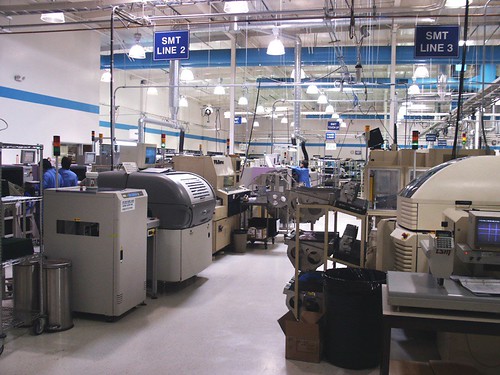
Learning From How a Toyota Supplier Saved $1 million by Updating Its Tech Infrastructure

Production floor  
My second post in an on-going series of blogs on lessons we can learn from commercial sector technology implementations.


A recent article on TechRepublic shows how Toyota supplier, AW North Carolina (AWNC) spent $1.2m on new Cisco equipment, which has led to significant savings for them. Few charities will invest that amount in a new CRM system, but some of the approach which AWNC took provides us with very useful ideas for the benefits which charities may get from new CRM implementations, often regardless of size.


1) "Downtime at AWNC costs $272,000 an hour, so it's crucial to get systems up and running as quickly as possible. Any downtime, particularly in shipping, is incredibly detrimental."

Okay, so it's unlikely that a CRM system being down for an hour at a charity would have quite such high costs! However, downtime due to a poor or unsupported system or inadequate IT infrastructure is not always factored in to a charity's view on whether they need a new CRM/fundraising system.

So consider: what would it mean to your staff if they couldn't access their database for an hour? Probably, it wouldn't be terrible for most fundraisers/staff, they could cope for that time, although Supporter Services would no doubt find it awkward for managing in-coming phone calls. But what about half a day? Now staff will be getting more anxious, a backlog of income processing might build up, supporter services are finding it more difficult and major donor fundraisers can't see their contacts' details. What about a full day? Much harder now: thank you letters might be delayed, management for a forthcoming event becomes much harder, and what would happen if that day happened to be the day when you were due to do your Direct Debit claim?

So it's not just the cost of a new CRM system - all this needs to be considered when looking at investment.

2) "As a result of the new technology, AWNC avoided maintenance costs on the old equipment of $1 million in the first nine months the system was in place"

Again, unlikely for most charities that they will save $1m in nine months due to replacing a CRM/fundraising system, but I have come across several NFPs who are paying existing suppliers ridiculously high annual maintenance costs for what they are getting, even without upgrades and developments. And/or they have to have specialist, higher paid staff for their current, old system because there are so few people who can support it. So even if it is going to cost you £x to invest in a new CRM system, what are your savings going to be in the first 12 months? (In the next 5 years?) Forget "possible extra income" benefits for a moment, these figures are hard cost savings.

3) "About 40% of the savings will be ongoing and realized annually."

We forget this sometimes, that savings (and benefits of course) will not just be the first year, but over the following five to seven years. So in addition to point (2) above on immediate savings, what other costs will be lowered or made more efficient by a new system? Lower staff costs? Or maybe, the same staff costs but those staff being far more efficient, productive and proactive? Time-savings from quicker processes? Time-savings (and better productivity) from simpler, quicker development tools? Development you can do in-house now rather than having to always go to an expensive software supplier?

4) "It was very clear... that the infrastructure was not keeping current with where the world had gone."

We're all aware that digital is where fundraising is going. Yes, there will still be plenty of 'traditional' or offline income coming in for some years to come, but that appears to be declining, and GDPR/DP issues could be forcing our hand in terms of reducing direct marketing. There is a point when you do need to review how and whether your existing CRM/fundraising system can support you and provide additional benefits with your future fundraising plans because of changes in the outside world.

5) "It's common in a manufacturing plant to avoid buying new equipment in a misguided attempt to save money, with IT teams not realizing that the operational costs to troubleshoot problems and the associated downtime in a factory environment can result in even higher costs."

I love this! How many of you have suffered from this problem with your antiquated or unsupported fundraising databases?! (And it's kind of reassuring that commercial organisations have this problem too!)

6) "The big push for last year was solidifying the environment, and this year is all about pushing out into the applications and into the manufacturing space to impact yield inventory."

This is just a small point to show that any new CRM implementation does not have to be rolled out to everyone or to manage all potential benefits immediately. Plan for future expansions in the subsequent years after your immediate go-live - you don't need to, and shouldn't try to do everything on day one.

Monday, March 13, 2017

What we can learn from large, failed IT Projects

HOLMES system (Home Office Large Major Enquiry System) 
This is the first blog I am planning in an occasional series on lessons we can learn – good and bad - from commercial/public sector system implementations; looking outside the charity sector for best practice and alternative approaches we might take.


On Computing's website last week, there was an interesting article which says how “Accenture 'underestimated the complexity' of failed [£50m] national IT system for Police Scotland”. Whilst this is clearly on a different scale to all NFP CRM projects, there are some good lessons to consider regardless of what size project you are managing.1 The following are some of the key lessons I think we can take:

“Early disagreements between Police Scotland and Accenture led to a breakdown in relationships and a loss of trust that never fully recovered”.

This is a classic problem and shows how important client-supplier relationships are and supplier management for the client. One of the few things we can say with (99%!) certainty is that something will go wrong sometime during any CRM implementation, and therefore if you have set off on the right foot and started developing good relationships with your supplier, then when the beep hits the fan, you should be in a better place to manage such instances far more appropriately.

“Within weeks [of the contract award], and despite 18 months of pre-award discussions, Accenture and Police Scotland disagreed about whether the proposed system would deliver the requirements set out in the contract.”

First, if you are really arguing about scope and requirements “within weeks” of a contract award, then you have probably not managed the procurement appropriately for your requirements, and/or you are kicking off the project in the wrong way. And/or you have not created an appropriate Business Case pre-project which should have declared what the benefits were which you were expecting, and thus what you were looking for from a system.

In addition to initiating the implementation correctly, it shows how difficult and yet how important your procurement process and any associated tender (ITT) document can be. You should be able to define the fundamental requirements and scope enough so that you are not arguing so early, but I am not convinced that a long, complicated ITT document would necessarily mean you would avoid such issues.

For most CRM projects for charities, the procurement process should be about finding the right supplier, the right business partner for you, and their software/solution is part of that. But I do not think that, for most charities with their resources and needs, that a tender document can be certain to (or even should) cover the whole scope, encompass all functional and non-functional requirements, and do it to such a level that no disagreements will come later.

There are increasingly good reasons, therefore, especially for larger CRM projects and especially when building on CRM platforms, for doing an initial ‘discovery’ phase after the initial contract award which will spend more, detailed time detailing what is required from the rest of the project: what, when, how and who is responsible. To a certain level at least. And at least so that the client and supplier know more than they did pre-sale and so the supplier can refine and provide more accurate cost/time estimates on the agreed scope/requirements. Even if you are planning an Agile implementation thereafter, this ‘waterfall’ part of the implementation is well worth while.

“The programme was complicated and highly ambitious [and] the idea was to merge more than 130 legacy systems.”

Any IT/CRM programme where you know it is going to be ‘complicated and highly ambitious’ needs to be thought through more carefully before implementation. Can you really manage such a project in ‘one go’? Should you instead break it down into blocks/smaller sub-projects (regardless of project management methodology), thus considering how some aspects of it could be de-risked and the different blocks made less complex?

If you are going to merge several/many legacy systems, then this is a wonderful opportunity to break down the implementation into multiple blocks, prototype, do early go-lives for limited users/functionality, learn lessons as you go along. Even if those lessons show the project will be more complex than first thought, then get this lesson sooner rather than later.

You can still be considering ‘the overall’ project at the same time (e.g. considering how you can do merging/de-duping from each legacy system into one, looking at overall visions/benefits) whilst you are doing one or two of the early migrations.


"The two parties had initially believed that the majority of the system could be based on an existing IT system that Accenture had delivered elsewhere. But… as the design and development process developed, it became apparent that Accenture would need to develop significantly more than what had originally been anticipated."

If a supplier says the majority of their system can be based on an existing system they have, well, if that is the case, couldn’t you be shown that system up-front? And if so, then both sides could tell far sooner (i.e. pre-sale) if it really is viable to be re-used? Similarly, if it is that good, then couldn’t a simpler ‘fit gap analysis’ help in the first place? If that shows it is a larger gap than expected then, again, find out early.

If you are buying a CRM system based on a platform and you are being told there is 'an existing system' you can use, then ask for more evidence, do more work on investigations, plan how you are going to run the project accordingly and ideally, consider if the contract can reflect that.

And if your supplier does not have experience in your sector, with your requirements, then although that certainly does not necessarily mean that they could not do it, it does show that you need to be more careful about the procurement process.


“After Police Scotland tested the system, Accenture estimated that meeting the requirements of the contract would take an additional two-and-a-half years, with the live date pushed back to April 2018, almost four years later than originally planned. [And] Police officers found 12 critical errors that made the system unusable, with 76 defects in total that required more work.”

This shows that ideally you do not wait until UAT to test such fundamental issues. Ask how the design is being done earlier. Are there critical factors you can test earlier, even in a waterfall project? An ‘agile’ or iterative approach (even a hybrid waterfall/agile methodology) can also help mitigate some of the risks of doing UAT close to a go-live which might mean that only then will you find issues that could push back go-live so significantly.


“Accenture underestimated the complexity [of the project].”

This sums it all up and it is sadly something I have seen on a number of charity CRM implementations by (large and small) suppliers and business partners. Maybe they don’t know your business/sector well enough, maybe they have under-quoted even if they do know it, maybe you as a client didn’t explain the complexity well enough. I hope that all the above points should help mitigate some of this possibility.


1. I want to emphasise that this blog post is in no way suggesting that only Accenture have issues such as this! Clearly you could have the same issues with any supplier. And, of course, I don’t have any knowledge of this specific project except for what the article provided – but I do think there are generic points we can learn.

Thursday, February 16, 2017

What Small Charities Need to Know About CRM Systems – 2nd Version

I have updated my free ebook, What Small Charities Need to Know About CRM Systems. Buying a new CRM system or fundraising database can be a daunting experience for any NFP organisation, let alone a small charity. So although I publish a lot of information on my blog which I hope is useful for all charities, this book contains some points which I think smaller not-for-profit organisations need to particularly be aware of or specifically consider.

As before, this book has been produced for people whose day job is not the procurement or implementation of new databases – which for small charities is probably almost everyone! And you do not have to be technical to understand it. It is for fundraising managers, chief executives, trustees and fundraisers, but of course I hope it is equally useful for database staff and charity IT staff too.

This second version has a brand new section on System Development and updates throughout the rest of the book to reflect my latest thoughts and the software options now available to the sector.

Click here to download the PDF for free.

Tuesday, December 20, 2016

12 Key Lessons From My Last CRM Project

On the twelfth day of Christmas, my truelove gave to me... Twelve Key Lessons I Learned From Managing My Last CRM Project


I thought I would finish this set of blog posts with a quick-fire set of some of the most important lessons I learned from the last CRM project I managed. Each point really deserves its own dedicated blog post, but I hope they provide a succinct set of tips in themselves:

  • Configuration not Customisation where possible: I have blogged about this before and it remains true. The more you can Configure and use the software's built-in tools and GUI to configure and define your system, the better. Each bit of Customised code will add cost, time, risk, pain and something you should try to avoid unless you can see real benefits, at least during implementation.
  • Don't try to re-create your existing database: It is so easy to go down the path of replicating exactly what you do now but just in a new CRM system, when what you should be trying to do is use the functionality and approach and benefits of the new CRM system. If you have bought system X then use it as it was meant to be used. Long-term that will set you up so much better.
  • Yes, ask users what they want, but then start with a simple base configuration and go from there: i.e. don't try to do every little single thing which users ask for, don't try to change every form on every screen for n different teams, don't bend and change the software in complicated ways when you are still learning and building it. Instead, get the basic requirements, use the software in as simple way as possible to get a starting point and then show the users that - if there are then things which you really have to change then you can consider them at that point or even post-live.
  • Don’t under-estimate the challenge of data integration: Integration is hard, no matter how you do it. Think of all those external data sources you need to import, that other system you want to share data with/update from your new system. It takes time, effort and money. Some suppliers may have starting points for some things such as JustGiving etc and that's good, but you may still need to change things.
  • Treat reporting as its own workstream: Reports are always one of the things in a project where you start off with great intentions and then as the project goes on, you can find they slip down the order of priority. I would recommend managing them in a dedicated workstream, with a dedicated member of staff leading on them. Remember: reports are one of the key reasons you have a fundraising/CRM system in the first place!
  • Work hard at supplier relationships: At some point in your implementation, it is highly likely that something will go wrong and you will need to discuss something painful with your supplier. The better your relationship with your supplier at that point, the more likely you will be able to come to a mutually satisfactory conclusion. It needs work but it's worth it.
  • Consider a Product Owner/Solution Owner: In a large CRM project with a significant timeline and budget, consider including a role of Solution Owner (aka Product Owner). This is a role for someone who understands not only the charity's requirements and strategies but also fundraising/charity requirements more generally, as well as CRM software and technology. The reason for this is because the implementation of sophisticated, flexible (and often expensive) CRM software systems is of course not just about the software but about building/configuring and using it with the people and processes in mind - and understanding the whole approach, design, dependencies and implications of design. The role provides a central point of contact for design understanding and fundamental decision making.
  • You will always need more people on your team: As the project progresses, you will no doubt find that you could do with more people working on your project, although it could be that you don't know all the exact roles when you start the project. So think about this up-front, budget for it and bring on some roles as you go through the project. Ideally, have a budget for future roles but have an agreement with your project board that you can define the actual roles later. And backfill if you can - always good to up-skill both the people you bring on to the project and the staff who step-up to do the BAU whilst those other people are on the CRM team.
  • Think about the post-live structure of your database support team ahead of time: It could well be that the roles you have in your current database support/CRM team will be different to those which you will need with your new CRM/fundraising system, especially if you are moving from a traditional/proprietary software to a CRM Platform,  Think about this as far ahead as possible and make plans.
  • You can mix-and-match your approaches to cost within the project: There is always the question of whether you should go for a Time and Materials (T and M) or a Fixed Cost budget. In fact, you could mix and match even in the same project. For example, some of the development work might be T and M but the data migration could be a fixed cost. Etc.
  • Post-Live: Use a Roadmap, not Phases. I will point you to my older blog post on this as the principle still stands. I believe that having a roadmap approach to post-live development is far better and more efficient than the concept of Phase 2, Phase 3 etc.
  • The importance of fun in internal comms: When you are engaging all your users, staff and stakeholders with your regular communications (which you have planned, yes?), then think of the one word which many people would describe such comms. Go on, close your eyes now and do it... Okay, got that word? Was it... "Boring"?! Sorry, that is often how it is! So make your internal comms more fun: whether it is with more innovative emails, interactive demos, screens in the staff room, lunchtime meetings with food, competitions with chocolate... It doesn't matter so much what it is, but try to think what would make you read something you didn't want to read and do that.

Monday, December 19, 2016

Supplier Catchphrase Bingo!

On the eleventh day of Christmas, my truelove gave to me... Eleven Things Which Suppliers Say at Demos Which You Can Use to Play Supplier Catchphrase Bingo!


So this is mainly for fun but with a serious(ish) message. The next time you have a software demonstration from a supplier or set of suppliers, listen to their spiels and see how many of the following phrases they say which you can tick-off in each presentation...

We offer the best support in the sector Our system provides a 360 degree view We want to be a partner with you
This is a Game Changer You must be in the Cloud Our system is completely Future-Proofed
We’re specialists in sorting out other suppliers' problems You don’t need any documentation (We do) Agile...
You should never buy… (e.g.) a CRM Platform/proprietary fundraising software…
X isn’t difficult (e.g. data migration, integration, reconciliation with your finance system, security)

Of course, some suppliers may say some of the above things and genuinely mean them. Some companies of course implement CRM systems using an Agile project methodology and may well do it well (I'm just sceptical of what exactly they mean by that or if it is just a buzzword they are using); some will truly believe that Cloud is best (for them at least); and some may well have sorted out another supplier's "problems" at another charity - but by the time you've met a few, each one of them will be claiming they have sorted out another's problems...

My point here is not to ridicule suppliers, but to emphasise that they are, understandably, selling to you. You need to ask questions, dig down into specifics, request examples, ask them to show you specific elements of their software, talk to their implementation and support staff, have second meetings and so on and so on.

And always take with a pinch of salt any company that says their software is completely future-proofed.


Friday, December 16, 2016

Ten CRM Case Studies for Charities

On the tenth day of Christmas, my truelove gave to me... Ten Useful Case Studies of How NFPs Are Using CRM Systems


Case studies are a useful way to see how charities and the NFP sector have implemented fundraising and CRM systems. The following are ten such examples (in alphabetical order):

NB For clarification: this list in no way indicates that these are the ten best or the only ten systems you should consider. There are many more and you can see a more comprehensive list of Fundraising Software and CRM Systems on my website.


Thursday, December 15, 2016

Nine Costs to Remember when procuring CRM Systems

On the ninth day of Christmas, my truelove gave to me... Nine Costs to Remember when procuring CRM Systems


There are many costs which you need to take into account when procuring and then implementing a new CRM System or Fundraising Database. The following are the core costs:
  • Software Licenses: Regardless of the type of license - perpetual vs monthly/annual (subscription) licenses, and concurrent vs named vs unlimited user numbers - you need to make sure you are comparing like-for-like across all your potential options, including any 'core module', additional modules/apps etc. (And that's before you consider and compare actual functionality and benefits.)
  • Hosting/Storage: This can be different depending on whether you are looking at cloud or on-premise or third-party hosting. It is comparatively simple to cost at an "explicit" level but can be very difficult when looking more deeply. At a simple level, Cloud systems will probably include x Gb of storage with your standard price and then you pay extra for every additional Gb you need. Bear in mind that can add up, especially for larger databases. You will therefore need to work with potential CRM suppliers to calculate how much storage you will need - and then add more to allow for future growth. That can be difficult. With on-premise solutions, the explicit cost is of course the hardware and associated software - but the harder costs are the fact that your internal IT staff will need to maintain that hardware, do upgrades etc, which is why Cloud salespeople say Cloud is so much cheaper. And for on-premise, you should probably also allow for the cost of new servers every n years, depending on your organisation's policy.
  • Internal Project Team: Except for small database implementations, you will almost certainly need specific costs for an internal project team, back-filling etc. (See Christmas Tip #6 for a few more thoughts on this). Such costs could vary depending on the type of software or supplier you select.
  • Supplier Professional Services. This has the potential to be a wide range of costs - and one of the highest budgets. For example: consultancy, system design, development and customisation, creating blueprints, report writing, installation, support with UAT, post-live support, project management etc etc. Read another blog post of mine about how you can compare suppliers' professional services costs and what to look out for.
  • Data migration: I have separated these from the rest of the Supplier Professional Services because, for any database larger than a simple spreadsheet, they can be harder to cost up-front, until a supplier has had the chance to look at your existing database in detail. For larger projects, this won't come cheap - do not under-estimate.
  • Training costs: whether it is internal, using a third-party/contract trainer or using the supplier's staff.
  • Integration: If your project involves integration of any sort (and it almost certainly will if it is for fundraising), from receiving online donations on your own website or data from JustGiving, through to importing data from fulfilment houses and exporting to finance systems - and more - then these costs can start to add up. I have written several posts specifically about integration over the years. Bear in mind 'integration' can mean different things to different people and to different suppliers so be careful when comparing costs and approaches. Talk to all suppliers in detail to clarify any uncertainties.
  • Annual (on-going) Costs: Software Support/Maintenance - Most traditional fundraising package suppliers charge x% per year for software support/maintenance but that often includes future upgrades too. With CRM systems, the business partners you implement the software with will also likely charge annual support costs which will vary depending on whether they are selling a 'template' solution, developing from 'vanilla' etc. And Software licenses - if you are paying on a monthly/annual basis then you will of course continue to pay such costs every year. To compare, annualise them and compare over n years.
  • Other Costs: Okay, I know this category could include anything but that's the point! I do also want to emphasise that there are any number of other, additional potential costs in a fundraising or CRM implementation, from hardware and workstations, to PAF and banking validation software, other people costs, paying fulfilment houses and other suppliers to change file formats and so on and so on. Find what you need and build them in to your final budget.

Wednesday, December 14, 2016

Eight Gartner Building Blocks

On the eighth day of Christmas, my truelove gave to me... Information on how Charities Could Use Gartner's 8 Building Blocks of CRM Framework


For larger (and probably also mid-size) charities looking to implement a new CRM system, and who want to understand the implications of CRM other than technology on their organisation, then you could certainly take a look at Gartner's "Eight Building Blocks of CRM" framework.

This is a toolkit which forms a framework that contains the elements which Gartner define as necessary for a successful CRM initiative: vision, strategy, customer experience, organisational collaboration, processes, information/insight, technology and metrics.They emphasise that all eight building blocks are essential for successful CRM but key is the fact that only one of the eight blocks involves technology, which underlines the importance of viewing CRM as a business strategy.

I also like Gartner’s Definition of CRM: "CRM is a business strategy with outcomes that optimize profitability, revenue and customer satisfaction by organizing around customer segments, fostering customer-satisfying behaviours and implementing customer-centric processes. CRM technologies should enable greater customer insight, increased customer access, more-effective interactions, and integration throughout all customer channels and back-office enterprise functions." Replace 'customer' with 'supporter' and remove profitability and that's a good definition for charities too.

I won't go into each building block here - far better for you to read their approach yourself if you are interested. But I will quote one more thing from their report which I also agree with: "True CRM isn’t easy. It requires board-level vision and leadership to drive a “relentless focus on the customer”; otherwise, it will remain fragmented. It involves potentially difficult changes to processes, culture and organization that can make the technology support seem easy." Well said.

- - -

The original Gartner paper is available on Gartner's website, but you can also find the report as a download on various websites as part of other reports. One example is the CustomerThink website.


Tuesday, December 13, 2016

Seven Free Apps for CRM Systems

On the seventh day of Christmas, my truelove gave to me... 7 free apps/software which can be used with Charity CRM Systems


I am always cautious about saying that software is free, because so often there are some sort of costs associated with it, even if the price tag itself is zero. With that caveat in mind, here are some free apps/software which I hope could be useful for CRM and fundraising software implementations:

  • Power BI Publisher for Excel: Microsoft's Power BI is a great tool to enhance the visualisation of data. Using it, you can take snapshots of your most important data/insights in Excel, such as PivotTables, charts and ranges and pin them to dashboards in Power BI.
  • Free Raiser's Edge Plug-ins from Zeidman Development and SmartTHING: David Zeidman and Warren Sherliker are both fantastic developers of plug-ins and customisations for The Raiser's Edge. And although they charge for their developments, they also offer some apps and 'lite versions' for free. If you use Raiser's Edge then their websites are both well worth checking out.
  • Free Salesforce apps: The Salesforce AppExchange has lots of free apps, some definitely better and more useful than others, but it's a great resource for Salesforce users. There are email integration tools, dashboard apps, data management apps and more.
  • XrmToolbox for Dynamics CRM: If you already use Dynamics then you may know about this add-on already, but if you don't use it or if you are thinking of using Dynamics then this is a wonderful free tool to know about. As it says on the their website, "it is shipped with more than 30 plugins to make administration, customization or configuration tasks easier and less time consuming". Good stuff.
  • Gift Aid calculator for your website: This is a free piece of Javascript which I designed myself some years ago to show donors how much their donation would be worth with Gift Aid. Anyone is welcome to use, amend and incorporate it as they wish; it is probably used mostly by small-mid size charities who want a quick and easy (if not so beautiful!) solution.
  • Free CRM Software: CiviCRM and KindLink. CiviCRM is an open source CRM solution for NFPs and KindLink is a recent addition to the charity market for cloud CRM software. However, I urge you to remember that just because the software is free, it does not mean it is zero cost - read my specific blog post about this - it's old but still relevant.
  • Talend Data Integration software: Talend has an Open Source version (Open Studio) as well as a paid-for commercial version, but the open source version is still extremely powerful. It will help you integrate data between different sources and your CRM system. But be aware it is not simple software - you almost certainly will need a dedicated expert to use it.
If you want to recommend any other free software/apps etc then please do add them in the Comments below.


Monday, December 12, 2016

Six roles you need in your CRM project team

On the sixth day of Christmas, my truelove gave to me... A list of 6 roles needed in larger CRM Implementations


For larger CRM implementations in particular, the following are six roles which would be very useful. Some of them might not needed immediately when a project kicks-off, but they will be required thereafter.

  • Project Manager: A good project manager is central to the success of a CRM implementation. They run the project day-to-day and deliver the project, hopefully within the budget and timescales and of the quality required and, importantly, act as the central communication hub to all stakeholders and interested parties.
  • Solution Architect: This is a role which is becoming more and more important when you are implementing a Salesforce/Dynamics type project where the system design is so crucial. For such projects you should have your own in-house solution architect. They will translate user/business requirements into the (data) architecture for the CRM system at a technical level, and quite likely work alongside your supplier's solution architect.
  • Business Analyst(s): They will work with your users and Subject Matter Experts (SMEs), extract their business requirements, document them and quite possibly create business/data flows of the processes. They are essential so that you can identify all your needs and processes and will be extremely helpful when it comes to implementing the new CRM.
  • Data Migration manager: Although this might depend on who is doing the data migration (from the old to the new system) and how it will be done, at the very least you will need a person in your own organisation who really understands the in-depth detail of the existing database so that they can work with the new supplier. At the other extreme, it might be that they need to be even more hands-on in terms of mapping and migrating the data into the new CRM system.
  • Test Manager: Regardless of your project methodology, you will need to test the build of your new CRM system, the data migration, work with your users and so on. A Test Manager to manage and co-ordinate all this will be invaluable.
  • Trainer: Someone to train your staff on the new system. The best trainers I have worked with also understand 'the business' and don't just train in a 'press that button' style, but relate the new software to the users' needs and processes. They might even have some BA skills.
There are of course other roles such as in-house developers, product manager/solution owner, change manager, report writer, project support staff and so on.


Friday, December 09, 2016

Five Golden Things Which Underlie CRM Systems

On the fifth day of Christmas, my truelove gave to me... 5 Golden Rules (which are not about the software)

Whenever an organisation is reviewing or implementing a database, it is important to understand that it is not just the CRM software/the database which needs to be considered. There are at least five other key factors which influence any CRM system.

  • Strategy - i.e. your fundraising strategy, management structure, communication strategy etc. This may sound obvious but if your fundamental strategy for fundraising, your communication policies, your IT strategy, even your management structure is not well structured then how can you expect your database to support your requirements. This underlies all aspects of CRM and indeed most technology projects. (And trust me, I have consulted at one or two organisations where some of the above were definitely not in place).
  • Data: The best CRM system in the world will not be efficient for your use if your data is not up to scratch. You need to consider what data you are recording, how you capture it, data quality issues, data consistency, data integrity across fields and tables and so on. (There are plenty of other posts on this blog about data if you want to read more). Of course, any CRM software needs to be able to store the data you want and manage it well, but these days that should be the case with most contemporary solutions.
  • Processes: When reviewing/implementing a new fundraising or CRM system, you should review your business processes. In my experience, there are three reasons that any process linked to your CRM software exists:
    1. No-one knows why they are as they are, it is just done that way because it is..; or:
    2. Because your current computer software makes you do it this way; or:
    3. Because you have thought about it carefully and your current process is the most efficient way to do things. 
    • Sadly, as much as I wish it was, the third option above is rarely what I find when I talk to charities. So: before you blame any poor database for the situation you might be in with it, have a look at your business processes and decide if they really are setup as best they could be, or whether there is room for improvement. I would bet there is.
  • People: Are your staff trained on how to use the software? Who by? How is a new starter shown what to do? Do you have enough and the correct database support staff? And if you are going to buy a brand new CRM system, then be aware that your current database staff structure might not necessarily be what you need going forward.
All the above are, in my opinion, more important than the software/CRM system itself. i.e. You can have the best software but if you have rubbish data, if your staff aren't trained and supported, if your business processes have not been thought through, then you will find it difficult to get the most out of your CRM system.

  • I also used to say the same about the final, fifth factor: your IT infrastructure. I would describe how if your server was too old and under-powered, if your internet connection was too slow, then again, your CRM software would suffer. And of course that is still true. But with hardware being so much more affordable and powerful now, with Cloud systems and access to the cloud so much more robust, I hope that this is now rarely such an issue. Of course, it is still important and it can still mean that good software will not work so well, but it is one of those things - given the correct budget - that should be more manageable.
If all this sound obvious to you then that's great, I'm delighted. But if you are finding that your current CRM system is not doing what you want, or you are looking at buying a new system then do bear all this in mind.


Thursday, December 08, 2016

Four SAAS Fundraising Software Systems for Smaller Charities

On the fourth day of Christmas, my truelove gave to me... A list of fundraising software created for the Cloud for small-mid size NFPs.
 

There are now a number of fundraising systems which have been designed as Software as a Service (SAAS) applications; i.e. they run on browsers, in the Cloud without the need for you to download anything on to your PC. These systems are specifically, proprietary software solutions which have been designed for fundraising and which you can use immediately with their built-in functionality (i.e. as opposed to CRM platforms like Salesforce/Dynamics which can be extended to provide fundraising functionality).

Here are four such systems (in alphabetical order):

Access thankQ CRM: The original version of thankQ was created quite some years ago and although you can still install it on your own servers, the latest version can now also be run as a SAAS option. It is functionally rich and a favourite for many users. Of the four systems here, it is probably more oriented to medium-sized charities but plenty of smaller charities have used thankQ over the years.

Donorfy: Donorfy is the newest of these systems and has been designed by Robin Fisk and Ben Brett who originally designed ProgressCRM some years ago. It is a good, clean system with new functionality being added all the time. And even though it was originally designed for smaller charities, it is increasingly being seen as an option for mid-size charities too. And the great news for very small charities is that you can use it with up to 500 constituents for free.

DonorPerfect: DonorPerfect started in the US but has steadily added customers in the UK as well, if not at the same rate as some other systems. It has all the standard fundraising management functionality you would expect and also has a mobile app for iOS and Android. Like the other systems here, although it can be used by smaller NFPs, it can also scale for mid-size charities too.

eTapestry, from Blackbaud: eTapestry has been around for many years now and always as a SAAS application, so its design has grown well. And the last few years have seen a significant increase in its user-base in the UK. There are three versions of it, with more functionality for the higher-end options. It also has new functionality being added over the months.


Wednesday, December 07, 2016

Three Cartoons With a Useful Message

On the third day of Christmas, my truelove gave to me... A few things to make me smile and yet still learn about CRM!


It's Christmas and so I feel one of my twelve tips (well maybe two, but the other post comes later...) should have some jollity. So here are three cartoons which I think are funny but they can also be used to explain a useful (serious?!) message:

1. Dilbert - my favourite cartoon series and I could use a dozen of them to emphasise different aspects of CRM procurement and implementation. But here's the one I have chosen:


(Just in case the cartoon does not embed properly, then try refreshing the page or click here to see the original).

I guess the message is pretty clear! As I often comment on this blog, it doesn't matter how good your software is: if your staff aren't trained, or if processes aren't clear or they are not followed, or if your supplier isn't paying attention to your requirements (and you haven't noticed) then you can have the best CRM System in the world and people can still be the fly in the ointment.

2. The Cloud. Ah, that wondrous and magical thing, the answer to everything. But...


It doesn't mean it is always the right thing to use for everyone every time. Yes, there are tremendous benefits from the Cloud but don't think it always has to be that way. What if you have large volumes of data? What if you already have a well structured and well supported on-premise IT infrastructure? What if the software you like isn't actually cloud-based?! Just make sure that the Cloud is considered as one of your options, not the only option.

3. Project Management. This cartoon was originally created in the 1960s and rather sadly it is still as pertinent today as it was then!

I'll leave it to you to interpret it for your future projects, but the bottom line is that you need business understanding, consistency, documentation (as you can see!) and project management structure, whatever your project management methodology is.


Tuesday, December 06, 2016

Two CRM Giants - Now Good Options for Larger Charities Too

On the second day of Christmas, my truelove gave to me... A brief discussion on Microsoft Dynamics 365 and Salesforce.


When I started this blog in 2009, I wrote that I was still reserving judgement on whether Microsoft Dynamics CRM and Salesforce were truly valid options as fundraising systems for charities, especially larger NFP organisations. Since then, I have watched the changes in both systems and there is now little doubt that - implemented well - both platforms now can support charities with their fundraising requirements.

There are good reasons for this: not only has their functionality and configurability improved, and there are now 'NFP templates' which can sit on both platforms, but equally as important (maybe more so), there are increasingly a number of implementation business partners who work with these platforms who now have got a good understanding of the software and fundraising – and that was definitely lacking just a few years ago. Of course, both systems also have excellent software licensing costs for charities (not the be-all-and-end-all of any procurement, but it still helps) and they are almost always recognised by key research companies such as Gartner and Forrester as being amongst the top CRM players.

And although there have been a constant number of small to mid-size charities implementing both systems for fundraising over the last five years, the last couple of years has also seen the first large NFPs go-live with their fundraising implementations on these platforms: first, Barnardo's on Salesforce and then WaterAid on Dynamics. And there are at least a couple of other large charities who I believe should go-live on those platforms in 2017.

They are also terrifically flexible and configurable, so you can of course use them for more than just fundraising if you want to. Indeed, most implementations of both systems were not for fundraising in their earlier versions.

Of course, there are still challenges, most notably the concern of cost for large volumes of data if you go on a Cloud version, and performance for large data-sets for some operations should always be considered (Although, as I have written before, I would question if you do still need all your data online).

And there is still a lot of hype about Salesforce and other CRM Systems (and there are of course alternative CRM platforms to Dynamics/Salesforce) and so don't just go and buy a CRM blindly. Remember that they are not the only option for fundraising: there are also several very good proprietary software solutions which have been designed specifically for the charity sector. So you do need to decide which is right for your requirements.


Monday, December 05, 2016

Implement A Single Source of Truth

On the first day of Christmas, my truelove gave to me... Details on Why a Single Source of Truth is so Important


It has always been important for charities to have a ‘single source of truth’ for their core data, but if anything, it will become even more critical in the years ahead.

What I mean by this is that if you want to know a supporter’s latest address, their most up-to-date communication preferences, who is stewarding them in your charity etc; or if you want to know the average income from your last n appeals, your total registration information for your events; and so on… then you need to know that you can get the correct information by going to one source system.

If you still have more than one database which stores the same information, multiple spreadsheets which have been created by different users, or if your data integration processes from your website or other data sources are not working, then it is highly likely that you will get a different answer depending who you ask or where you look.

You need a single source of truth.

However, do note that this does not mean you necessarily need to have only one database or even the infamous 360 Degree View. You could well have multiple databases but as long as you have a ‘central system’ where your core data is collated then you should be able to get the figures you need. And, of course, you need to ensure that there are not teams in your organisation who have their own spreadsheets “because they're my records…”.

Depending on your database setup, the goal of a single source of truth may not be too difficult - it may be more about consolidating data flows and processes - or it could be much harder f you do have many data repositories and a lack of organisational control/understanding for where data is stored and why. One good option for medium/large organisations is to have a data warehouse where you can collate all your important data and where specialist staff can create reports for your KPIs which everyone will trust and know is right.

Make this need your first organisational New Year resolution.

Friday, December 02, 2016

The 12 Tips of ChRistMas (for charities)


Okay, sorry, I know that's a terrible use of an acronym (not even a real use), but, well, somehow the time of year has got to me and I wanted to add my own little bit of festive cheer and provide a few short, sharp blog posts which I hope will take you through the season and into the New Year.

So, starting next week, I will be providing my 12 Tips of ChRistMas (for charities). These will cover procurement tips, implementation thoughts, data, people's roles and even a whole post on how you can have a little bit of fun (ho ho ho) the next time you get a presentation from a CRM or fundraising database supplier. Software demos will never be the same...

I hope they will be useful. Please do let me know what you think as I start publishing them.

Tuesday, February 10, 2015

What Small Charities Need to Know about CRM Systems: Free ebook

I have just published a new, free ebook:  What Small Charities Need to Know about CRM Systems. Buying a new CRM system or fundraising database can be a daunting experience for any NFP organisation, let alone a small charity. And although I publish a lot of information on this blog which I hope is useful for all charities, there are some points which I think smaller organisations need to particularly be aware of or specifically consider. So I have brought these issues together into a new, free ebook.

Which in some ways was quite difficult! Because when I read back over my blog posts, so many more of them are equally appropriate for small charities too! I have therefore limited myself to just twelve areas which I believe should give a small charity a solid understanding of what they need to know about CRM systems and fundraising databases. But if you want to know more, then there's lots more on all my other blog posts.

Who this Book is Intended For
The book has been produced for people whose day job is not the procurement or implementation of new databases - which for small charities is probably almost everyone! And you do not have to be technical to understand it. It is for fundraising managers, chief executives, trustees, fundraisers, office managers, volunteers and those working in supporter services, but of course I hope it is equally useful for database staff and charity IT staff too.

If there are any points you think I should have included in this book then feel free to add them in the comments below.

How to Download the Book
You can download the book from my website: http://www.itforcharities.co.uk/free-ebooks/.

Tuesday, February 03, 2015

Are charities really ready yet to take full advantage of CRM platforms?

ready (or not) 

So often during procurements and marketing pitches, the undoubted benefits of CRM systems are laid out by suppliers for charities. This is understandable and correct - why shouldn't charities know what they could be achieving and the benefits of such platforms.

However, I sometimes wonder if most charities, or even some are really ready to take full advantage of such technology. I don’t mean from a fundamental or standard operational angle, clearly those systems have every chance of giving charities what they want for the start of any such project. But how many organisations have the people, the time, the resources, the clarity, the strategy, even the budget to really take it a step further after the initial implementation?

This is not because I don't think that charities don't want to, I'm sure they do, and not because they don't have the vision or understanding. Again, I am sure some charities do and I hope such organisations are getting the tremendous benefits which such systems can bring.  But I wonder if that is still done by just a minority of NFP organisations.

Why not?
If you consider all those factors listed above then the one over-riding thing which I think has the most impact on this is: People. People are the problem and the answer. Because it is the people which make the difference in taking full advantage of CRM platforms.

Consider skill-sets. Clearly charities have had people supporting their fundraising and similar databases for years but traditional fundraising packages have needed different skill-sets to those which the CRM systems require in order to exploit them to the max. For example, whereas the fundraising packages were in many ways more limited, the CRM systems are almost unlimited in their potential. But to achieve that potential you need someone with Business Analysis skills to be able to find out from the users, the fundraisers not just what they want but to interpret those wishes so that they can be implemented in a CRM system. This is not often something I find in mid-size charities and only sometimes in larger NFPs.

Then you need developers. Sometimes this will only require comparatively fundamental 'admin' type staff who will simply need to configure a CRM system, but for the more powerful and far-reaching benefits you may need specialist developers who can code the systems and get so much more from them. And this will mean new skills, new programming languages and a new understanding of how to get the most from those advances.

All that takes management, planning, different team structures and a different sort of approach to the fundraising packages.

So if you do want and can employ such people, then that means the other factors which will be needed will follow-on: time, budget, strategic vision. If you don't have the right people then there's no need for those other things.

But it's still not necessarily just that...
There's also one more difference which charities need to adopt, and that's a new mindset. Many database managers of the traditional fundraising systems will sadly have become used to being limited to only being able to work within the constraints of those systems, finding workarounds or paying a lot of money to their supplier and even then waiting to get extra work developed for them - or even having to say No to users when they are asked to provide requested functionality.

So to find yourself in a position where you could now theoretically say Yes to so many of the things requested by your users is of course exciting, but it also means knowing how to progress such requests. How should you configure or develop the systems? How should you ensure you are definitely doing what is best? (Don't just do what is asked for immediately - question such user requirements to make sure they are definitely what is really wanted and what will achieve the best results. e.g. Don't just add another tick-box field…). Do too much too quickly and you may introduce confusion or not do things properly; too slowly and it won't have the possible impact it could have. Do it without planning and you could find yourself having to unravel things and start again. Do it without understanding of database development and you could end up with a worse system, more unmanageable than that which you started with.

Don't let any of this stop you from buying and implementing the CRM systems and then developing them. Just make sure you have got the right building blocks in place first. The right people.