Showing posts with label Implementation. Show all posts

Monday, March 13, 2017

What we can learn from large, failed IT Projects

HOLMES system (Home Office Large Major Enquiry System) 
This is the first blog I am planning in an occasional series on lessons we can learn – good and bad - from commercial/public sector system implementations; looking outside the charity sector for best practice and alternative approaches we might take.


On Computing's website last week, there was an interesting article which says how “Accenture 'underestimated the complexity' of failed [£50m] national IT system for Police Scotland”. Whilst this is clearly on a different scale to all NFP CRM projects, there are some good lessons to consider regardless of what size project you are managing.1 The following are some of the key lessons I think we can take:

“Early disagreements between Police Scotland and Accenture led to a breakdown in relationships and a loss of trust that never fully recovered”.

This is a classic problem and shows how important client-supplier relationships are and supplier management for the client. One of the few things we can say with (99%!) certainty is that something will go wrong sometime during any CRM implementation, and therefore if you have set off on the right foot and started developing good relationships with your supplier, then when the beep hits the fan, you should be in a better place to manage such instances far more appropriately.

“Within weeks [of the contract award], and despite 18 months of pre-award discussions, Accenture and Police Scotland disagreed about whether the proposed system would deliver the requirements set out in the contract.”

First, if you are really arguing about scope and requirements “within weeks” of a contract award, then you have probably not managed the procurement appropriately for your requirements, and/or you are kicking off the project in the wrong way. And/or you have not created an appropriate Business Case pre-project which should have declared what the benefits were which you were expecting, and thus what you were looking for from a system.

In addition to initiating the implementation correctly, it shows how difficult and yet how important your procurement process and any associated tender (ITT) document can be. You should be able to define the fundamental requirements and scope enough so that you are not arguing so early, but I am not convinced that a long, complicated ITT document would necessarily mean you would avoid such issues.

For most CRM projects for charities, the procurement process should be about finding the right supplier, the right business partner for you, and their software/solution is part of that. But I do not think that, for most charities with their resources and needs, that a tender document can be certain to (or even should) cover the whole scope, encompass all functional and non-functional requirements, and do it to such a level that no disagreements will come later.

There are increasingly good reasons, therefore, especially for larger CRM projects and especially when building on CRM platforms, for doing an initial ‘discovery’ phase after the initial contract award which will spend more, detailed time detailing what is required from the rest of the project: what, when, how and who is responsible. To a certain level at least. And at least so that the client and supplier know more than they did pre-sale and so the supplier can refine and provide more accurate cost/time estimates on the agreed scope/requirements. Even if you are planning an Agile implementation thereafter, this ‘waterfall’ part of the implementation is well worth while.

“The programme was complicated and highly ambitious [and] the idea was to merge more than 130 legacy systems.”

Any IT/CRM programme where you know it is going to be ‘complicated and highly ambitious’ needs to be thought through more carefully before implementation. Can you really manage such a project in ‘one go’? Should you instead break it down into blocks/smaller sub-projects (regardless of project management methodology), thus considering how some aspects of it could be de-risked and the different blocks made less complex?

If you are going to merge several/many legacy systems, then this is a wonderful opportunity to break down the implementation into multiple blocks, prototype, do early go-lives for limited users/functionality, learn lessons as you go along. Even if those lessons show the project will be more complex than first thought, then get this lesson sooner rather than later.

You can still be considering ‘the overall’ project at the same time (e.g. considering how you can do merging/de-duping from each legacy system into one, looking at overall visions/benefits) whilst you are doing one or two of the early migrations.


"The two parties had initially believed that the majority of the system could be based on an existing IT system that Accenture had delivered elsewhere. But… as the design and development process developed, it became apparent that Accenture would need to develop significantly more than what had originally been anticipated."

If a supplier says the majority of their system can be based on an existing system they have, well, if that is the case, couldn’t you be shown that system up-front? And if so, then both sides could tell far sooner (i.e. pre-sale) if it really is viable to be re-used? Similarly, if it is that good, then couldn’t a simpler ‘fit gap analysis’ help in the first place? If that shows it is a larger gap than expected then, again, find out early.

If you are buying a CRM system based on a platform and you are being told there is 'an existing system' you can use, then ask for more evidence, do more work on investigations, plan how you are going to run the project accordingly and ideally, consider if the contract can reflect that.

And if your supplier does not have experience in your sector, with your requirements, then although that certainly does not necessarily mean that they could not do it, it does show that you need to be more careful about the procurement process.


“After Police Scotland tested the system, Accenture estimated that meeting the requirements of the contract would take an additional two-and-a-half years, with the live date pushed back to April 2018, almost four years later than originally planned. [And] Police officers found 12 critical errors that made the system unusable, with 76 defects in total that required more work.”

This shows that ideally you do not wait until UAT to test such fundamental issues. Ask how the design is being done earlier. Are there critical factors you can test earlier, even in a waterfall project? An ‘agile’ or iterative approach (even a hybrid waterfall/agile methodology) can also help mitigate some of the risks of doing UAT close to a go-live which might mean that only then will you find issues that could push back go-live so significantly.


“Accenture underestimated the complexity [of the project].”

This sums it all up and it is sadly something I have seen on a number of charity CRM implementations by (large and small) suppliers and business partners. Maybe they don’t know your business/sector well enough, maybe they have under-quoted even if they do know it, maybe you as a client didn’t explain the complexity well enough. I hope that all the above points should help mitigate some of this possibility.


1. I want to emphasise that this blog post is in no way suggesting that only Accenture have issues such as this! Clearly you could have the same issues with any supplier. And, of course, I don’t have any knowledge of this specific project except for what the article provided – but I do think there are generic points we can learn.

Tuesday, December 20, 2016

12 Key Lessons From My Last CRM Project

On the twelfth day of Christmas, my truelove gave to me... Twelve Key Lessons I Learned From Managing My Last CRM Project


I thought I would finish this set of blog posts with a quick-fire set of some of the most important lessons I learned from the last CRM project I managed. Each point really deserves its own dedicated blog post, but I hope they provide a succinct set of tips in themselves:

  • Configuration not Customisation where possible: I have blogged about this before and it remains true. The more you can Configure and use the software's built-in tools and GUI to configure and define your system, the better. Each bit of Customised code will add cost, time, risk, pain and something you should try to avoid unless you can see real benefits, at least during implementation.
  • Don't try to re-create your existing database: It is so easy to go down the path of replicating exactly what you do now but just in a new CRM system, when what you should be trying to do is use the functionality and approach and benefits of the new CRM system. If you have bought system X then use it as it was meant to be used. Long-term that will set you up so much better.
  • Yes, ask users what they want, but then start with a simple base configuration and go from there: i.e. don't try to do every little single thing which users ask for, don't try to change every form on every screen for n different teams, don't bend and change the software in complicated ways when you are still learning and building it. Instead, get the basic requirements, use the software in as simple way as possible to get a starting point and then show the users that - if there are then things which you really have to change then you can consider them at that point or even post-live.
  • Don’t under-estimate the challenge of data integration: Integration is hard, no matter how you do it. Think of all those external data sources you need to import, that other system you want to share data with/update from your new system. It takes time, effort and money. Some suppliers may have starting points for some things such as JustGiving etc and that's good, but you may still need to change things.
  • Treat reporting as its own workstream: Reports are always one of the things in a project where you start off with great intentions and then as the project goes on, you can find they slip down the order of priority. I would recommend managing them in a dedicated workstream, with a dedicated member of staff leading on them. Remember: reports are one of the key reasons you have a fundraising/CRM system in the first place!
  • Work hard at supplier relationships: At some point in your implementation, it is highly likely that something will go wrong and you will need to discuss something painful with your supplier. The better your relationship with your supplier at that point, the more likely you will be able to come to a mutually satisfactory conclusion. It needs work but it's worth it.
  • Consider a Product Owner/Solution Owner: In a large CRM project with a significant timeline and budget, consider including a role of Solution Owner (aka Product Owner). This is a role for someone who understands not only the charity's requirements and strategies but also fundraising/charity requirements more generally, as well as CRM software and technology. The reason for this is because the implementation of sophisticated, flexible (and often expensive) CRM software systems is of course not just about the software but about building/configuring and using it with the people and processes in mind - and understanding the whole approach, design, dependencies and implications of design. The role provides a central point of contact for design understanding and fundamental decision making.
  • You will always need more people on your team: As the project progresses, you will no doubt find that you could do with more people working on your project, although it could be that you don't know all the exact roles when you start the project. So think about this up-front, budget for it and bring on some roles as you go through the project. Ideally, have a budget for future roles but have an agreement with your project board that you can define the actual roles later. And backfill if you can - always good to up-skill both the people you bring on to the project and the staff who step-up to do the BAU whilst those other people are on the CRM team.
  • Think about the post-live structure of your database support team ahead of time: It could well be that the roles you have in your current database support/CRM team will be different to those which you will need with your new CRM/fundraising system, especially if you are moving from a traditional/proprietary software to a CRM Platform,  Think about this as far ahead as possible and make plans.
  • You can mix-and-match your approaches to cost within the project: There is always the question of whether you should go for a Time and Materials (T and M) or a Fixed Cost budget. In fact, you could mix and match even in the same project. For example, some of the development work might be T and M but the data migration could be a fixed cost. Etc.
  • Post-Live: Use a Roadmap, not Phases. I will point you to my older blog post on this as the principle still stands. I believe that having a roadmap approach to post-live development is far better and more efficient than the concept of Phase 2, Phase 3 etc.
  • The importance of fun in internal comms: When you are engaging all your users, staff and stakeholders with your regular communications (which you have planned, yes?), then think of the one word which many people would describe such comms. Go on, close your eyes now and do it... Okay, got that word? Was it... "Boring"?! Sorry, that is often how it is! So make your internal comms more fun: whether it is with more innovative emails, interactive demos, screens in the staff room, lunchtime meetings with food, competitions with chocolate... It doesn't matter so much what it is, but try to think what would make you read something you didn't want to read and do that.

Wednesday, December 14, 2016

Eight Gartner Building Blocks

On the eighth day of Christmas, my truelove gave to me... Information on how Charities Could Use Gartner's 8 Building Blocks of CRM Framework


For larger (and probably also mid-size) charities looking to implement a new CRM system, and who want to understand the implications of CRM other than technology on their organisation, then you could certainly take a look at Gartner's "Eight Building Blocks of CRM" framework.

This is a toolkit which forms a framework that contains the elements which Gartner define as necessary for a successful CRM initiative: vision, strategy, customer experience, organisational collaboration, processes, information/insight, technology and metrics.They emphasise that all eight building blocks are essential for successful CRM but key is the fact that only one of the eight blocks involves technology, which underlines the importance of viewing CRM as a business strategy.

I also like Gartner’s Definition of CRM: "CRM is a business strategy with outcomes that optimize profitability, revenue and customer satisfaction by organizing around customer segments, fostering customer-satisfying behaviours and implementing customer-centric processes. CRM technologies should enable greater customer insight, increased customer access, more-effective interactions, and integration throughout all customer channels and back-office enterprise functions." Replace 'customer' with 'supporter' and remove profitability and that's a good definition for charities too.

I won't go into each building block here - far better for you to read their approach yourself if you are interested. But I will quote one more thing from their report which I also agree with: "True CRM isn’t easy. It requires board-level vision and leadership to drive a “relentless focus on the customer”; otherwise, it will remain fragmented. It involves potentially difficult changes to processes, culture and organization that can make the technology support seem easy." Well said.

- - -

The original Gartner paper is available on Gartner's website, but you can also find the report as a download on various websites as part of other reports. One example is the CustomerThink website.


Monday, December 12, 2016

Six roles you need in your CRM project team

On the sixth day of Christmas, my truelove gave to me... A list of 6 roles needed in larger CRM Implementations


For larger CRM implementations in particular, the following are six roles which would be very useful. Some of them might not needed immediately when a project kicks-off, but they will be required thereafter.

  • Project Manager: A good project manager is central to the success of a CRM implementation. They run the project day-to-day and deliver the project, hopefully within the budget and timescales and of the quality required and, importantly, act as the central communication hub to all stakeholders and interested parties.
  • Solution Architect: This is a role which is becoming more and more important when you are implementing a Salesforce/Dynamics type project where the system design is so crucial. For such projects you should have your own in-house solution architect. They will translate user/business requirements into the (data) architecture for the CRM system at a technical level, and quite likely work alongside your supplier's solution architect.
  • Business Analyst(s): They will work with your users and Subject Matter Experts (SMEs), extract their business requirements, document them and quite possibly create business/data flows of the processes. They are essential so that you can identify all your needs and processes and will be extremely helpful when it comes to implementing the new CRM.
  • Data Migration manager: Although this might depend on who is doing the data migration (from the old to the new system) and how it will be done, at the very least you will need a person in your own organisation who really understands the in-depth detail of the existing database so that they can work with the new supplier. At the other extreme, it might be that they need to be even more hands-on in terms of mapping and migrating the data into the new CRM system.
  • Test Manager: Regardless of your project methodology, you will need to test the build of your new CRM system, the data migration, work with your users and so on. A Test Manager to manage and co-ordinate all this will be invaluable.
  • Trainer: Someone to train your staff on the new system. The best trainers I have worked with also understand 'the business' and don't just train in a 'press that button' style, but relate the new software to the users' needs and processes. They might even have some BA skills.
There are of course other roles such as in-house developers, product manager/solution owner, change manager, report writer, project support staff and so on.


Friday, December 09, 2016

Five Golden Things Which Underlie CRM Systems

On the fifth day of Christmas, my truelove gave to me... 5 Golden Rules (which are not about the software)

Whenever an organisation is reviewing or implementing a database, it is important to understand that it is not just the CRM software/the database which needs to be considered. There are at least five other key factors which influence any CRM system.

  • Strategy - i.e. your fundraising strategy, management structure, communication strategy etc. This may sound obvious but if your fundamental strategy for fundraising, your communication policies, your IT strategy, even your management structure is not well structured then how can you expect your database to support your requirements. This underlies all aspects of CRM and indeed most technology projects. (And trust me, I have consulted at one or two organisations where some of the above were definitely not in place).
  • Data: The best CRM system in the world will not be efficient for your use if your data is not up to scratch. You need to consider what data you are recording, how you capture it, data quality issues, data consistency, data integrity across fields and tables and so on. (There are plenty of other posts on this blog about data if you want to read more). Of course, any CRM software needs to be able to store the data you want and manage it well, but these days that should be the case with most contemporary solutions.
  • Processes: When reviewing/implementing a new fundraising or CRM system, you should review your business processes. In my experience, there are three reasons that any process linked to your CRM software exists:
    1. No-one knows why they are as they are, it is just done that way because it is..; or:
    2. Because your current computer software makes you do it this way; or:
    3. Because you have thought about it carefully and your current process is the most efficient way to do things. 
    • Sadly, as much as I wish it was, the third option above is rarely what I find when I talk to charities. So: before you blame any poor database for the situation you might be in with it, have a look at your business processes and decide if they really are setup as best they could be, or whether there is room for improvement. I would bet there is.
  • People: Are your staff trained on how to use the software? Who by? How is a new starter shown what to do? Do you have enough and the correct database support staff? And if you are going to buy a brand new CRM system, then be aware that your current database staff structure might not necessarily be what you need going forward.
All the above are, in my opinion, more important than the software/CRM system itself. i.e. You can have the best software but if you have rubbish data, if your staff aren't trained and supported, if your business processes have not been thought through, then you will find it difficult to get the most out of your CRM system.

  • I also used to say the same about the final, fifth factor: your IT infrastructure. I would describe how if your server was too old and under-powered, if your internet connection was too slow, then again, your CRM software would suffer. And of course that is still true. But with hardware being so much more affordable and powerful now, with Cloud systems and access to the cloud so much more robust, I hope that this is now rarely such an issue. Of course, it is still important and it can still mean that good software will not work so well, but it is one of those things - given the correct budget - that should be more manageable.
If all this sound obvious to you then that's great, I'm delighted. But if you are finding that your current CRM system is not doing what you want, or you are looking at buying a new system then do bear all this in mind.


Tuesday, February 03, 2015

Are charities really ready yet to take full advantage of CRM platforms?

ready (or not) 

So often during procurements and marketing pitches, the undoubted benefits of CRM systems are laid out by suppliers for charities. This is understandable and correct - why shouldn't charities know what they could be achieving and the benefits of such platforms.

However, I sometimes wonder if most charities, or even some are really ready to take full advantage of such technology. I don’t mean from a fundamental or standard operational angle, clearly those systems have every chance of giving charities what they want for the start of any such project. But how many organisations have the people, the time, the resources, the clarity, the strategy, even the budget to really take it a step further after the initial implementation?

This is not because I don't think that charities don't want to, I'm sure they do, and not because they don't have the vision or understanding. Again, I am sure some charities do and I hope such organisations are getting the tremendous benefits which such systems can bring.  But I wonder if that is still done by just a minority of NFP organisations.

Why not?
If you consider all those factors listed above then the one over-riding thing which I think has the most impact on this is: People. People are the problem and the answer. Because it is the people which make the difference in taking full advantage of CRM platforms.

Consider skill-sets. Clearly charities have had people supporting their fundraising and similar databases for years but traditional fundraising packages have needed different skill-sets to those which the CRM systems require in order to exploit them to the max. For example, whereas the fundraising packages were in many ways more limited, the CRM systems are almost unlimited in their potential. But to achieve that potential you need someone with Business Analysis skills to be able to find out from the users, the fundraisers not just what they want but to interpret those wishes so that they can be implemented in a CRM system. This is not often something I find in mid-size charities and only sometimes in larger NFPs.

Then you need developers. Sometimes this will only require comparatively fundamental 'admin' type staff who will simply need to configure a CRM system, but for the more powerful and far-reaching benefits you may need specialist developers who can code the systems and get so much more from them. And this will mean new skills, new programming languages and a new understanding of how to get the most from those advances.

All that takes management, planning, different team structures and a different sort of approach to the fundraising packages.

So if you do want and can employ such people, then that means the other factors which will be needed will follow-on: time, budget, strategic vision. If you don't have the right people then there's no need for those other things.

But it's still not necessarily just that...
There's also one more difference which charities need to adopt, and that's a new mindset. Many database managers of the traditional fundraising systems will sadly have become used to being limited to only being able to work within the constraints of those systems, finding workarounds or paying a lot of money to their supplier and even then waiting to get extra work developed for them - or even having to say No to users when they are asked to provide requested functionality.

So to find yourself in a position where you could now theoretically say Yes to so many of the things requested by your users is of course exciting, but it also means knowing how to progress such requests. How should you configure or develop the systems? How should you ensure you are definitely doing what is best? (Don't just do what is asked for immediately - question such user requirements to make sure they are definitely what is really wanted and what will achieve the best results. e.g. Don't just add another tick-box field…). Do too much too quickly and you may introduce confusion or not do things properly; too slowly and it won't have the possible impact it could have. Do it without planning and you could find yourself having to unravel things and start again. Do it without understanding of database development and you could end up with a worse system, more unmanageable than that which you started with.

Don't let any of this stop you from buying and implementing the CRM systems and then developing them. Just make sure you have got the right building blocks in place first. The right people.

Monday, November 24, 2014

So: what makes us think it will be different this time?

Albert Einstein painted portrait _DDC9387 

It's a sad fact that so many fundraising/CRM database implementations fail or are not nearly as successful as we hoped. And although there are various potential reasons for this which are central to many of my blog posts, we can also look at this problem in another way - if you have experienced a failed project at your organisation in the past, then ask yourself this: If we are about to launch a brand new CRM procurement and implementation project, what makes us think it will be different this time?

If this strikes a chord with you and you want to ask this question internally at your organisation, then here are some questions you could consider and try to address. Hopefully, they will (at least start to) give you the ability to decide whether or not you have learned from previous projects and tell you a lot about yourselves before you embark on another big project.
  • What were the reasons for failure on the last project? (Did we even hold a Lessons Learned meeting?)
  • Did we even define success criteria? Were they measurable, achievable, realistic?
  • Do we have a proper business case? Has it been ratified by more than just a couple of people?
  • Are we asking the same people to run and be involved with the new project? If so, why do we feel they can now do it? Do they have that much better experience now? Do they know all the pit-falls they could encounter this time? Have we sent them on any sort of training or learning programme since?
  • Have we got new people involved? Are they any better?! Do we need more people?
  • Are our senior managers fully engaged?
  • Do we understand what our risk is? Do we know how to mitigate or accept risk?
  • How do we really know we have got an appropriate budget this time around?
  • How do we really know our planned timescale is possible or realistic? Could it even be too slack?
  • Do we have a project manager? What sort of experience do they have?
  • Do we have project governance? Do we understand project governance?
  • Even if we do feel we have learned lessons, how will we monitor the next project to make sure it stays a success?
  • Was our actual data an issue? Do we have new faith in that now?
  • How can we be sure that the next salesperson we meet doesn't spin us the same lines as last time?
As I said above, in some ways many of my blog posts encompass the above in specific areas or in more detail. So please do search for anything particular in my blog archive which might come out of your considerations. (And hopefully the links within the above list are a good starting point for other useful posts).

Maybe I can use a famous Albert Einstein quote to sum-up: "The thinking it took to get us into this mess is not the same thinking that is going to get us out of it."

Monday, November 03, 2014

The new world of cloud storage - do you really need ALL your old data?!

Traditionally, when moving from one fundraising database to a new one, charities tend to migrate all their old data across - or very nearly all. Sometimes, small sub-sets of old or truly unneeded data may be left behind, but in the main, every single donation, communication, appeal record etc and every entity and every field is transferred as is to the new database.

Why? Well, understandably, fundraisers and marketing staff are worried about losing granularity of historic data, of not being able to do true and useful RFV calculations or similar analysis on summary fields, of not being able to look back at why someone responded to appeal X or came to event Y. And the thought of either not keeping their data in the most granular state possible, or even not transferring it at all, has been a complete anathema!

But recently, this is something which is being challenged. This is partly due to cloud CRM systems charging for extra storage, partly due to some performance concerns for complex processes on very large systems and partly to mitigate some of the risks and complications of data migration. And partly it is just good business practise to challenge such assumptions.

But Why?!
But just as pertinent a question for me is: Why - Why do you need ALL your old data? Really - why?! I mean, are you really going to look back at someone's communication history from ten years ago and want to see that a donor was sent a second letter because a particular acknowledgement letter didn't reach them first time? Do you really need to know that someone was invited to an event twelve years ago but didn't respond? I'm not sure if you do…

And although I completely recognise the need to keep a granular donation history for at least a set number of recent years (e.g. at least four years for gift aid claims), at what point are your fundraisers not going to use such data for segmentation and marketing analysis? Five years? Six maybe? In which case, do you really have to be able to see each individual donation for older periods as a separate financial transaction on your new system? Or actually, could a summary be acceptable? e.g. a summary by year/campaign/gift type/whatever is appropriate for you.

Of course, there are some data items you would definitely need to keep, such as first donation information, maybe upgrade details etc, but do you have to have more than that for donations over a certain age?

And if you do, if you have to or if your organisation is too paranoid not to keep such data, then maybe you can store it elsewhere for when (if!) it is needed. For example, a separate data warehouse, maybe a simple SQL Server database, even a separate marketing software system.

And what about any old data which you still have on your system but which almost no-one in your organisation trusts and so doesn't use anyway? Does that really need to be transferred? Really?! And data accuracy in general - just how good is it over a certain period anyway?

Or, Should we be asking, Why Not?
Now. One could of course ask why we shouldn't migrate all data and that's a fair question. Storage does cost but is it so much more? And contemporary systems are so much more efficient now than older systems, why shouldn't we have millions of records in our new database?

Well, maybe because more data does add extra data management, does add complexity when doing segmentation and reports/analysis, can slow down a system when running such processes, can make screens slower to load when they have lots of historic information, can make data migrations more complex etc etc.

I think it is an interesting challenge - one I encourage you to consider!

Monday, October 06, 2014

The importance of the client/supplier relationship

Untitled 

This is a slightly corny sounding subject at first sight, but it really is true and it really is important! The following are some of the things I have learned over the years which you might like to consider when buying and then implementing a fundraising, membership or CRM database (or anything else come to that!):
  • The first thing which helps in this area is that hopefully you will consider supplier empathy and approach even during procurement. Especially the lead/key staff you will be working with. If you select a company where their staff do appear awkward/unhelpful/blunt or just don't care about what you are doing, then that isn't going to help... You might do this if everything else about the company and software was so fantastic that you had to do so, but personally I wouldn't advise it. (This may be an obvious thing for me to say but in the NFP sector this can truly make a difference, compared to a hard-nosed commercial organisation)
  • The supplier should be on your project board/steering committee during implementation. This will really help the relationship and project. And if you also need to hold private board meetings without the supplier then that's fine, just make sure they are part of the key meetings.
  • Set ground rules for both parties in your kick-off meeting: start as you mean to go on. It's the best time to do this when you are both happy and enthusiastic!
  • Invite your supplier's key staff to one of your organisation's away-days, SMT meeting, fundraising planning workshop etc at the start of your implementation. It will give them a far better insight into what your charity does, what is important to you, what your staff are like and so on. (NB For suppliers who work with commercial clients too, you might well find their staff find it a refreshing thing to be working for a good cause - and the more engaged they are, the more likely they will pull out the stops to help you when push comes to shove).
  • Don't squeeze suppliers on costs til they bleed - it will backfire. They almost certainly will be a for-profit company so understand you do need to treat them as such.
  • Your contract should include a SLA (Service Level Agreement).
  • Ensure you have an Escalation Policy which covers what you will do and who will do it - for both parties - if anything does need escalating.
  • Build a more personal relationship with the supplier's key staff so that if you do have a problem or an awkward thing to discuss then it should be easier. Ditto if they need to come to you about such issues. Visit their office, meet their other staff, meet their CEO (or as high as you can go - you may not meet Marc Benioff or Satya Nadelle themselves!)
  • And when things go wrong, discuss them as openly and as honestly as possible. Don't shout! (I know this is basic advice but I have seen situations when it has not been followed...)

Monday, September 29, 2014

Beware fake implementation timescales

Time - one right one wrong 

This is a brief message: if you have been asked to plan a new CRM or fundraising database implementation, and you have been told to create a timescale for the project, then beware of the 'fake timescales' syndrome.

For example, if someone in your organisation (usually a senior manager…) says it must be done by date x, if there is no solid business reason for that date then don't just accept it. If you have over-run your procurement by a couple of months, then don't simply reduce the implementation time by 2 months - why has it suddenly become quicker to do just because you're starting later?! Or if your timeline is based on the fact that someone once did a project somewhere else in that timescale...

Of course, if you have an absolute deadline for a good reason then that needs to be accounted for, although even those can sometimes not be definite. e.g. if you are moving office, then is there no way you can continue to access your old database in your new office - or is that just an excuse to get a deadline? If your current software supplier is stopping the support of your current database on date x, then maybe you can accept the risk of still using it for just a short-time after that rather than rush your new implementation?

What you should do is work with your supplier and your project team, your key staff and your organisation's whole calendar, and work out how many months the implementation should take regardless of when you are starting. (Then review it again and see if even that is realistic…) Then you can allow for any periods which might mean it could take longer (e.g. Christmas/New Year, your big annual event, August holidays) and extend if it necessary. And if that really, really is unacceptable to your project board then you will need to explain you will have to de-scope something and/or increase resources.

But don't accept fake timescales - they don't do anything except increase the risk of failure.

Monday, August 11, 2014

Why CRM Systems Are Like Icebergs for Charities

Antarctic Iceberg 

There is no doubt that the adoption of the generic CRM systems like Salesforce and Dynamics is increasing amongst charities and NFPs. But in comparison to the commercial sector we are still learning about the use of them. And in comparison to traditional fundraising databases (Raiser's Edge, thankQ et al) we still know less about them. Consequently, although there are definite benefits which the CRM systems bring, there may still be issues which we don't yet know about.

Bring on the iceberg...

My iceberg theory…
The fundraising database packages have of course been around for many years. Many organisations have implemented them, many people have implemented them at multiple charities and of course the suppliers have huge experience of them. And they have a more defined scope.

So we know many of the potential risks and issues with such systems (as well as the benefits of course) and when we start an implementation we can attempt to plan for and mitigate such risks. And even though there will inevitably be new risks/issues which occur during an implementation, I could have a good guess at some of the areas that some of those might occur within.

Whereas the opposite is true for the CRM systems - at least in the specific and critical area of fundraising. Because although there are of course existing charities who have implemented Salesforce, Dynamics et al for their fundraising needs, in comparison to the fundraising packages the number is still low. And those that have done may well have used different approaches to each other and very different configurations of such systems.

This is partly because of their newness, but also because of their flexibility, options, configurability and the breadth of functionality in the base platform. You (we) don't learn that overnight. And even as you do learn the system, so we have to apply that to get the best out of them for sophisticated and sometimes significant fundraising requirements.

And it isn't simply a matter of therefore finding an experienced CRM system supplier because they will also only have limited exposure to implementing their system for fundraising at charities and NFPs.

Hence the iceberg…

Because if it is true that 90% of an iceberg is underwater and thus we can't see it as we approach it, then the same could be said of CRM system implementations. In fact, it could be worse. Because at least we know that we can only see 10% of an iceberg above water, whereas actually we have no idea really as to how much of the "CRM iceberg" is submerged below water, waiting for us to hit it as we plough through the sea of implementation. I hope that in practise that we do know more than just 10% of what the potential risks/issues are, but I can't say for certain right now.

Whereas, with fundraising packages, one can almost turn that on its head (an inverse iceberg?) and say that we probably do know 90% of the potential risks/issues which could occur in a typical implementation of such systems.

So what can we do to plan the safe passage of the good ship CRM?

The good news is that although we may not know exactly what is coming to potentially scrape our bows as we sail past, we can have a good stab at knowing the sort of areas in which any issues might impact and thus even if we can't put a final mitigation plan in place for such risks, we can start now to consider how we should plan for them.

What do I mean by that? Well, let's take a complex income processing scenario. Maybe we know that our ideal requirements can be met by CRM system X only through customisation and coding. In which case, we can watch carefully as we start down that route, plan to take it slowly, test as we go along, re-test as we add further functionality, actually go-live with limited functionality and then build on that, and always have a back-out plan which might mean, say, that if we do find it is getting too complex/costly, then at least for the implementation we will decide to simplify the system itself and substitute the ideal functionality with off-line or manual processes instead.

Similarly, if we find that record volumes are causing a problem which we didn't know about for data migration, then we may decide to initially just migrate more recent data and then transfer older data more slowly over a period after we go-live. Or for gift aid claims, we could even have a third-party package ready to do some initial claims if we do hit a nasty bit of ice. And so on.

And overall we can follow good practise for any CRM implementation: get our requirements straight, make sure it is all documented for client and supplier, manage scope-creep, don't let shiny new whizzy stuff take you off down a path which you don't need to go down (at least not on day one), insist on good project management (internally and with the supplier), never forget your operational needs, look for true benefits and so on. Keep it all as simple as possible.

Reeling it back from the simile…

I realise that I am wandering off down the iceberg simile a bit too much, so let's reel it back to finish this post. What I am really trying to say is that we must not forget that some of the fundraising implementations already done on these CRM systems are still pioneers in their own way. We can do as thorough procurement processes as possible, we can learn as much as possible from commercial organisations who are more experienced in their usage and their business partners/suppliers, and we can learn some things from other charities who have already started to use these systems, but because of their sheer size and capabilities we must keep our eyes open and be ready if we hit a problem that we just hadn't thought of. Be ready for this as much as you can, and if that does happen then hopefully it will just be a slight scrape on our midship and we can avoid replicating the Titanic…

Monday, July 07, 2014

Should I change my processes to match the database or make the database change to match mine?

D.A.R.E. To Change, Process Flows, Office of the Cook County Medical Examiner 

This is a very common question I am asked: When I get a new database, should I change my processes to match the database and how it works, or should I make the database change to meet our processes? My views have actually changed on this over the last ten years and my own beliefs are now as follows:

First, It Depends...
First, there are a few "it depends" factors in this answer; the most important being:
  • Why your current processes are as they are. In my experience, there are three common answers when I ask "why do you do process X that way?": (i) "I've no idea, we've always done it that way…"; (ii) "Because the current database makes us do it that way"; and (iii) "We've thought it through carefully and this is the best approach for us". Sadly, the latter answer is rare and the first two, and a combination/variation of those is more likely.
  • Legal issues; e.g. gift aid, monitoring restricted funds etc. In these instances, the processes are going to have to reflect what is legally required anyway (although even here there could well be different ways to approach some of them).
  • The type of database you are implementing; i.e. fundamentally whether it is a vertical-sector (traditional) fundraising database package, or if it is one of the newer breed of generic CRM systems. Although this difference is blurring a bit as I will explain below.
Why Wouldn't You Review Your Processes?
Secondly, when you implement a new database, whatever you buy, reviewing your processes is one of the most useful things you can do. As I said above, unless you already know you are in the "This is definitely the best process for us" category (which is rare), then this is a great opportunity to review why you do something, how, what's good about it, what's bad, what takes time, what could be automated, what you don't need to do and so on. And then you can take all that knowledge to the database implementation so that you can review the best way forward with your new system.

What if you are implementing a Traditional (vertical-sector) Fundraising Database package? e.g. Raiser's Edge, thankQ, Redbourn etc.
Many of these systems have been designed and adapted with many years of experience of what the NFP sector requires. And most which are still being sold today (if not all) are still selling and being used because they do the fundamentals perfectly well. And therefore, if you are buying into them as a software package, as a system, then it would seem to make sense to me to adapt your processes to how the packages have been designed. If you aren't going to do that, then why have you bought that package in the first place? There may be tweaks to do, but I wouldn't recommend changing the systems themselves except for the bare minimum and definitely within any parameters which the supplier suggests.

What about "generic CRM systems" such as Microsoft Dynamics and Salesforce, which you are implementing from a "vanilla" version (i.e. 'out of the box')?
These systems will give you an incredible amount of flexibility - which unfortunately is a double-edged sword. On the one hand, that means you can probably adapt the system to whatever process you prefer (within reason), so if your process review identifies some potentially great benefits by doing a process a whole new way, then this might be a great opportunity. Although that will also have the potential of higher cost, longer time, more arguments (sorry!) and a more complicated system than you might have needed. You need to be very good at keeping a lid on the amount of change you plan. And also: if you can do (nearly) anything then where do you start?! How will you know if your new process really is the best approach? How far should you go when changing the database system? And if you end up with vast swathes of changes then do not underestimate the Change Management you will need to introduce to your organisation. 

What about generic CRM system with a "fundraising/membership template"? e.g. Supporter360, Silverbear.
There are now quite a few "templates" which suppliers have created to sit on top of Dynamics and Salesforce in particular. In this instance, you are probably somewhere between still being able to change your processes if you really want to, but because the templates will have their own starting point, it would still be sensible to be using them as a starting point for reviewing your processes. Otherwise, as with packages, why buy them?

So What Is My Final Answer...?
My personal belief is to keep change as simple as possible, to use the software as it is supposed to be used as much as possible and if necessary, to start simple with the changes and fine tune them (or change them more dramatically) over time. i.e. Unless there are good reasons not to, adapt your processes to the software.

As I've discussed before, it is only after you really get to know your new software that you will truly understand what it can do, how and the benefits it can bring, so I wouldn't advocate spending huge amounts of time and money on it until you know what you really want from it.

Monday, June 16, 2014

The hardest part of a database implementation is the post-live period

Walt Disney shows Disneyland plans to Orange County officials, Dec. 1954 

This has become a little bit of a hackneyed expression these days. To say that the you won't experience the hardest part of implementing your new CRM system or fundraising database until it goes live. "That's when the real work starts," you'll be told. But for good reason - because very often it's true.

Why is this?
  • Only at this point do you truly find out how the software is working for you. You can test forever and get as many users involved as possible during the implementation but it's not quite the same as once your staff are using the new system in anger.
  • Your implementation project was hopefully funded correctly, but sometimes there is less budget or even no budget for future work after go-live. Yet, many implementations/systems will still require more work on them at that time. Some of that work may have been planned for a future roadmap but some may only have been decided during the implementation, for example, if you had to cut-back on (or change) the scope. 
  • Resources (people) in particular will be 'back to normal' but potentially with different demands and requirements.
  • There will be an impact on your users such as pressure on your database team, potential drop in productivity for some areas of use on the new system, processes still being optimised and so on. Read my recent blog post on The Immediate Effect of CRM System Change On Staff for a more detailed discussion on all that.
  • There are bound to be things you didn't know about, you had thought you had tested but slipped through the net, that users didn't tell you correctly etc, and it's only when you go live that these issues will surface. Or things may have justifiably changed anyway, which will still cause issues.
  • The enthusiasm and adrenaline which the implementation project had may wane. 
  • The benefits which were envisaged/promised before the project commenced might not turn out to happen. Some may be understandable or yet happen soon, but others could have been over-sold or had too much expectation.
So what can you do?
  • If possible, keep some of the implementation project team for 'as long as possible' after go-live. Three months is a decent rule of thumb for the average sized fundraising database; hopefully by that time most key issues will have raised their head.
  • Prepare for some of the above as much as possible! At least those points you can prepare for, such as resources, expectations, impact. 
  • Understand resource implications in particular.
  • Have a plan for how to handle the new things you didn't know about - not the things themselves but a process for how to manage them when they crop up.
  • Explain all this to your SMT early as possible in a project - even during procurement. Get their understanding, acceptance, awareness and support - whether financially or otherwise.
  • And my personal belief is that doing a "Phase 2,3,4 etc" implementation is not the best approach. Instead, use a 'rolling development' plan with a roadmap. Read my separate blog on this: Why it is a Bad Idea to have “Phase 2” of a CRM Implementation (andPhase 3, 4, 5…)

Monday, June 09, 2014

When Users Don't Know What They Want: Keep it Simple

I have previously blogged about my belief that you should keep database implementations as simple as possible, configuring as much as possible and not customising etc. This post is a subtle but important variation on that: this post is based on my observation that much of the time end-users don't actually know what they want or what they could have - or even (completely understandably) what the software can do - and yet we continually ask them. (And even good business analysts may not always get to the crux of the matter). Unsurprisingly, perhaps, we therefore sometimes get a system which, when it goes live, is either far more complex than the user wanted, is not really what they expected, or you even get told, "Oh, actually, that bit wasn't really that important at all. In fact, we don't really do that anymore…"

So: why not give users the basics to start with, the as-close-to-vanilla as possible, and then adapt that later once they do start to really know what they want, once they understand the software and what it can do.

E.g.: Let's keep the forms simple, the data entry straight forward, the processes matching how the software has been designed. And if that means that a user has to do two or three clicks to achieve something rather than one, then that isn't such a terrible thing to have to do in the first place.

This should mean quicker, simpler, less risky, cheaper database implementations. And implementations which are likely to succeed. And happier users.


Thereafter, once we have gone live and the users realise what they have got, then they will realise what they have is either fine or, no, they really could do with process x being streamlined further or data items a and b being linked together. Great. Then do it.

Of course, this approach does require a strong project manager or solution owner, a good project board to support the PM when necessary and a clear, open approach to explain to the users that this is what we are doing.

Do note I'm not suggesting you just say No the whole time and hide all the really funky things the users actually do want and end up giving them the very bare bones possible. You can think a bit past that! Just be open and inclusive.

And of course, as I have written before, if you do take such an approach and if during your analysis and implementation you do find processes which would benefit from more automation or a more sophisticated approach - and which can be proved to have benefits to be that way - then by all means do it. Ultimately that is one of the great benefits of a CRM system so I am not saying don't do it at all. Just keep it under control.

Monday, June 02, 2014

The Immediate Effect of CRM System Change On Staff

Changed Priorities Ahead sign 
Recently on LinkedIn, there was a question which asked: "Does anyone have any indicators that would give me a steer in terms of what would be normal to expect when you bring in a new [CRM] system which changes the way people work?" I loved this question as it is so insightful and recognises that clearly this is going to be one of the key impacts and factors in the success or otherwise of the new system. I gave an answer online at the time, but here are my extended thoughts:
  • You should expect more calls to your help desk in the short-term. Users will inevitably need to ask how to do things, even if they have had good training. As well as comprehensive and appropriate training, floor-walking during the initial days of go-live can also help.
  • There will be more pressure on your Database Team (or equivalent) in the short-term. There is bound to be so much going on that your poor database team will probably have (or feel they have) twice as much to do now with this wonderful new system than they ever did before. Some of that might be true! Hopefully it will calm down as everyone learns the new system and its capabilities, but in some instances it might well be that there is more work for the database team even as the new system progresses.
  • It is quite possible to see a drop in productivity in the first instance for some areas such as batch donation processing - this might sound awful and ultimately you of course want it to go the other way, but there's no getting away from the issue that some people might find a new system slower to use at first.
  • No matter how much you've tested and re-tested, something will go wrong! And no matter how much you did some great business analysis to get the users' requirements, something may have been forgotten! I say this as a (mostly) serious point because I think it's a good thing to warn users in advance (i.e. during implementation) that this might be the case…
  • Some people may not have the functionality they used to have with the legacy system and they especially need careful managing. i.e. there may well be people who actually do lose something they used to have perfectly with the old system. Work with them closely to make the transition as painless as it can be.
  • Some processes may not be optimised yet. Not a problem, they can be optimised over the coming weeks - but be aware, don't think every process will immediately be better and be open to reviewing such processes and even having to re-consider if/how some should be managed differently.
  • If you do have any areas with many more problems than you expected, encourage users to always report everything to the help desk/database team as appropriate. If they don't then it won't get fixed. I know this sounds obvious but some staff might not bother and either just not use function x or start to find workarounds. And then you're right back to where you started…
  • BUT there will hopefully be good things too! Some users will (hopefully) love the new system, so they are great people to use as advocates for some quick-win stories for everyone else. Getting reports, information & insight that you couldn't get before is great.
Oh - and somebody, somewhere is going to say, "I don't know why we had to get rid of the old system…"

Monday, May 19, 2014

The Benefit of Documentation When Implementing New Databases

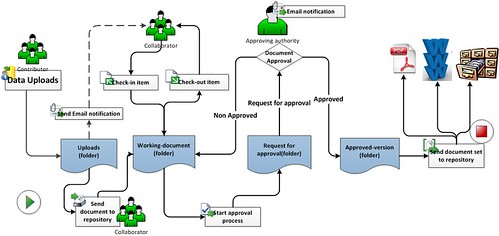
Document-management-workflow (Click on image/Press L for a full view) 

So: If you're reading this blog post and wondering why I am even bothering to write it - because of course documentation is important - then great! You can stop reading now! Go and have a laugh at today's Dilbert instead. But if you do doubt the benefit of documentation in database implementations (or if you like the sound of documentation lite…) then read on… Because this is why I think documentation is important:
  • Structure for project managers: It gives the people running the project structure - it helps them see what's what, where we are, what we are doing, who's doing it, what needs to be done and so on. I know these are easy words to write and perhaps not tight enough (especially for a blog about documentation!) but this is the heart of the benefits which documentation brings. As a project manager it gives me what I need.
  • Structure and assurance for project boards: Following on from the above point, it gives your project board the same assurance and support.
  • Accountability: This is important. It means that we have a written record as to what was discussed, decided, agreed (or not), for who, by when and so on. It's especially useful for when disagreements arise between a supplier and client, as we can then have at least a starting point to discuss.
  • Blueprints: For projects which do require some up-front consideration of how the database is going to be configured, especially where a third-party supplier is doing that work, blueprints are pretty much essential. This is what was decided by client and supplier, this is what the supplier will deliver, and this will help formalise the project and avoid (a set of) arguments later about this.
  • Data dictionaries: I wrote a blog recently about the benefit of data dictionaries - I still believe all that.
  • If someone leaves… I've been brought into projects where an organisation is half way through a database implementation and I have needed to catch-up quickly with where they are. The better the documentation - i.e. the more poignant it is, not necessarily the amount of it - the better it is for someone new to be able to get up to speed.
  • Agile methodology: I know some Agile evangelists believe that documentation is not so helpful because things can change so quickly in the next sprint anyway. I guess this is something that every Agile implementation needs to consider: is there some space and reason to have relevant documentation? Or do we agree it's not necessary. It might worry me sometimes…
  • The more attentive of you will have realised that much of what I am promoting is to do with "clients and suppliers". Yes, that's true. I do think this is where documentation can help. It keeps everyone on track, maintains a level, fair playing field for both parties and I think instils good practise in implementations.
Then of course there are project plans, risk registers, communication strategies, data mapping tables, file formats for data integration and so on. I realise that even fans of documentation lite might see these types of documentation as more useful, but that doesn't always seem to be the case in my experience. Personally, I think we need them.

And just to finish with a couple of caveats: Documentation does not have to mean wreathes of paper - a well structured, online system of "documentation" can be just as useful for many of these issues. As long as it is structured, searchable, auditable, accessible then great, I'm all for that. And I am not saying that you need to follow PRINCE2 to the letter and create Product Descriptions to the nth degree - i.e. I'm not saying you should have documentation for documentation's sake. I realise there are times when keeping documentation to a minimum - or rather, to the amount appropriate for your organisation and your implementation - is right. But I still think documentation is needed.

Monday, May 12, 2014

Why you need to listen to Donald Rumsfeld when implementing CRM systems...

The Unknown Known: What You Didn't Know You Didn't Know starring Donald Rumsfeld 

Some years ago, Donald Rumsfeld made his now infamous speech about known knowns and known unknowns. He of course got pilloried for it and was even given the Foot in Mouth Award for Bad English. And whilst I understand why he got such criticism, I would like to add one caveat: if he had been talking about CRM software implementations then he would have been lauded a genius!

Why?
Why?! Well, because I think he (unintentionally!) got the absolute essence of the problems you have when implementing databases:
  • First, the Known Knowns. Absolutely. We definitely have this - the processes and data we do know we have and we know we have to address in the new system. Tick.
  • Then, the Known Unknowns. Right again. These are the areas of our business which we know exist: the spreadsheets which we have heard something about, the small Access database which the trading team use - the data which has been in our database for 15 years and which, although we know it is there, we know nothing else about it! These are the things we know we have to tackle with a different approach when considering the new database.
  • And finally, the Unknown Unknowns. Ah yes - these are the horrible but inevitable things that occur in almost all database implementations. The things we didn't even know existed, the problems which no-one had even imagined we should consider, let alone resolve. They will happen - of course they will. And it's no-one's fault, it's just that some things may simply have never reared their head before, or something no-one other than the database manager who left 3 years ago knew about - or the issues which the fundraisers know are a problem but they have never discussed them before. They're lurking there somewhere…
My real point...
I genuinely think these are useful things to consider when implementing a new CRM or fundraising database. If you go into the project with this in mind then at least you can plan for even the Known Unknowns. And you might even be able to come up with some process for how you are going to tackle the Unknown Unknowns when they pop up; e.g. in terms of business analysis, documentation, impact assessment, forewarning users that if this happens then this is how you will approach it.

I'm not saying you should stand up at the kick-off meeting and quote Mr Rumsfeld word for word - but do let him sit quietly on your shoulder so you can call on him when needed.

Sunday, March 16, 2014

Salesforce: Why does one person love it and the next hate it?

Why have I written this post?
A few years ago I wrote a blog post called The Raiser's Edge: Why Does One Person Love it and the Next Hate it? Importantly, it wasn't about The Raiser's Edge per se, but it reflected my opinions on all similar fundraising packages - but I used RE as the key example because of its popularity. So, as I decided it was about time to update that post, I also thought I should make it a bit more contemporary and apply my thoughts to the well-liked generic CRM systems - and therefore, this time, use one of the currently most popular and most discussed CRM systems as my headline: Salesforce. But as before - let me emphasise - the points below are not solely about Salesforce; they could be just as true for other, similar CRM systems used by charities today: Microsoft CRM Dynamics, SugarCRM, Workbooks, NetSuite and so on.

I've also written this post because one of the most commonly repeated LinkedIn Discussions/Questions is: What Cloud CRM System Should I Use for my Charity? And then the questioner gets lots of answers about individuals' experiences and beliefs (and even the odd salesperson saying how great their system is…). And I wanted to provide what I hope is a more rounded, independent answer.

As before, with my Raiser's Edge post, I am sure that plenty of people will agree/disagree with my points below - and that's fine! If you want to discuss them then please do so in the Comments.

So, let's get to it:

Why do I think that one person you talk to will love Salesforce (et al) and the next person will hate it?
  • Configuration and Flexibility: One of the most important things about these CRM systems is that they are so flexible, configurable, customisable and extendable, and as a result one implementation may be completely different from the next, even if they are both addressing the same core fundraising functional requirements. It is of course fantastic that this can be done, and if it is done well then anyone using that particular implementation may well love it. But if not, if it didn't deliver what was promised - or perceived to be promised - if it took too long, cost too much and it seemed like it was still not giving someone what they really wanted, then it is hardly surprising that such users will not like it. It's the double-edged sword of such flexibility.
  • The start of the project and then the on-going bit… Following on from the above, it is also quite feasible that the CRM system was implemented well in the first place, and the users liked using it at that point. But for any number of reasons thereafter (e.g. budget, lack of impetus, lack of resources, the wrong resources, lack of understanding of CRM systems), it may not have been maintained well at some sites, and thus its usage at such charities could have dwindled and the users became disillusioned. And this is because if the CRM system was developed for the charity as its needs were at that time, then it is quite feasible that those needs may change over time. The good charities, the good Salesforce users, know this. But that's not everyone.
  • Cost of Start-up and perceived TCO: Salesforce provides 10 free licenses for charities and heavily discounts others thereafter; Microsoft also gives charity discounts for Dynamics; SugarCRM has an open-source option. So it can appear to the less well informed user that the software is free or very cheap. And why wouldn't you think that if you didn't know! And yes, this is a great thing because you can then spend your budget on key things like development, training, consultancy, implementation, data cleaning and so on. Critical things. Unfortunately, although the licenses are free/cheap, the design, development, resources needed and maintenance are not - they cost money, and carry on costing money. And if a charity is not aware of that, or unprepared, or thinks the CRM will do all they need without any of the above, then what did seem a low cost option suddenly is not.
  • Ease of Start-up and Type of User: Salesforce in particular is very easy to start to use: sign-up to a free trial, then buy the licenses (or get them free) and Bob's your uncle (or rather, Marc). No hardware issues, no need to deal with your IT department, no need to talk to any pesky salespeople (!) And Microsoft also offer a similar SAAS option now. Again, all that offers great benefits - it's the Cloud at its best. But it also means that anyone - database-savvy and the non-savvy alike - can start to use Salesforce, regardless of their database or CRM knowledge, their understanding of what it can do, of what you have to do to run such systems well. You would never get that with a "traditional fundraising database" - which shows one of their downsides and conversely their benefits at the same time. But if anyone can start to use Salesforce et al so easily, then there are bound to be people who don't really get it and therefore ultimately won't like it.
  • Different types of usage: All these CRM systems are now extremely flexible and can be used for a multitude of applications: fundraising, membership, client management, grant management, help desks, HR needs, (even sales!!) and many more areas of need. It's a really great thing about the systems and shows just what you can do with them. But if charity X has used it for membership management and says how great their implementation is, then charity Y, who wants to use it for grant management may not realise that it might not be so applicable for them or that they need to address it differently. And that can also lead to disillusionment.
  • The Salesforce and Dynamics fundraising/membership 'templates': Just to add to the complication of some of the above, there are now a number of good and getting-better 'templates' which third-party companies have designed to manage fundraising and membership almost out-of-the-CRM-box. So, not only do you now have the CRM system with all its pros and cons, you have another layer to consider which also offer benefits and downsides. But some people will still think of it as Salesforce, Dynamics etc. On the plus side, if a charity is using template X, then it can at least say how good/bad that template is, and other charities can get some feel for it that way. On the downside, such templates are just starting points which many charities will adapt and enhance which again will lead to differences of implementation; and ironically, as the templates become more package-like, so you then get the potential issues arising which I listed in my original Raiser's Edge Why Does One Person post. Plus ca change…
  • Data, People, Processes (even hardware…): And of course, regardless of everything I have written so far, even if you have the best possible CRM system, it still doesn’t matter a hoot if your data is rubbish, your users not trained, your processes not defined, your project management and implementation managed badly… and so on. All the things I bang on about so often in my other blog posts. As such, charity X, who has a great system with great people managing it and who really understands CRM, will indeed have the potential to have a great CRM system. Unfortunately, even if you gave exactly the same system and configuration to charity Y, who doesn't get CRM, data management, the need for investment in training etc, then that system will soon be hated by its users. Oh, and if you do buy a CRM system which you can install on-premise/hosted, then the hardware still needs to be up to scratch. And yes, this is exactly the same for Traditional Fundraising Databases as well. But just because you buy a CRM system, that doesn't mean those issues disappear.
  • Marketing and the Buzz of the Cloud: Finally, there is also no doubt that some CRM systems are helped by excellent marketing and the belief by some people that the Cloud is the answer for all their needs. The Cloud may well be an answer for some of some people's needs, but it's not quite as simple as that. Personally, I believe that if a system can't provide what you need it to do operationally - say, direct debit management, gift aid, income processing etc - then it doesn't really matter if it's in the Cloud or not. There's no point buying something that isn't right for you even if it does have superb technology (which many of these CRM systems do!) But the CRM suppliers/partners have great marketing staff!
Interestingly, having just re-read all the above myself, it's clear that in some ways some of the above points could apply to The Raiser's Edge and similar systems as well, as some are indeed generic database pros/cons; i.e. different types of user, the start of a new system vs n months/years down the line, ignorance about costs and so on. But it's the specific attributes and differences and approach of the CRM systems that make all these points especially poignant for Salesforce and the like.

Monday, January 27, 2014

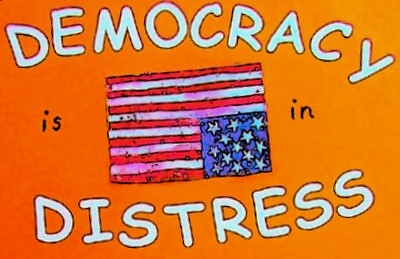
Why Database Implementations Should Not be a Democracy

Democracy in distress 
I fully believe in democracy - except when it comes to implementing databases. In which instance, one needs more of an approach of meritocracy with a touch of geniocracy but with a democratic input. (And maybe even some technocracy, which I never even knew really existed until I started researching this blog!).

But enough with the 'ocracies. What I am really saying is that there needs to be nominated, manageably-sized teams who are involved with and run database projects. When I hear of a project where everyone is trying to get involved, especially at the very top level or at the level of Subject Matter Expert, then I worry that is a recipe for disaster.

Why? Because when decisions need to be made, which they do all the time in projects, you need key people who are decision makers and who, yes, can take input and advice from other people, but who do not rely on waiting for lots of other people to actually make the decisions.

And if all this sounds like common sense to you and you are wondering why I am bothering to write this blog then fantastic! You can stop reading now! Unfortunately, in my experience, this is not always the case…

What you do need
You need a top-level Project Board (aka steering committee etc) but that needs to be a small group of key, high-level individuals who have the power to make decisions. And yes, you need input from Subject Matter Experts who already do the day-to-day work on the existing database(s) and who can provide the detailed input into what is needed in the new system.

But what you don't need and shouldn't have is a large team at either of these levels. That just won't work.

Have a large team at the top and you'll just get in-fighting, no decisions being made, or being made very slowly, and potentially a watered-down system which tries to cater for everyone by not being good enough for anyone. And it will almost certainly take much longer and cost much more…

And you certainly don't want so many Subject Matter Experts (SME) that you never get agreement on what people do or what they want to do. There can't be that many "experts". Build a hierarchy here so that we maintain the democratic input and the SME (or few SMEs) of each team can get input from their team members but when you hold design sessions, the SME can bring all that knowledge to the table.

In terms of the 'middle layer', what you need is a manageable project team who can do the day-to-day work on the project, with a strong project manager. I'm tempted to say that this too shouldn't be an uncontrollable size or that will get out of hand and everyone will abstain from responsibility. But in practise, at least in the NFP sector, it is a rare project that has too many people on a project team!

But don't try to make it a full democracy at every stage.

Unfortunately, many database implementations appear to be run as a kakistocracy. It's a real word - look it up if you don't know it; then you'll understand what I mean.

Sunday, November 17, 2013

The Importance of Report Designers during CRM Implementations

Time Tracking Report 

On one project I worked on, not long before we were due to go-live, there was some concern that a specific, highly important report could not be produced because of the fundamental, underlying design of the CRM system. And it made me wonder how this could have happened - that such an important factor had not been fully considered until that point. It turned out that the reason was because when the database was being designed, the report designer - i.e. the person who creates the reports, not the software - had not been consulted when they could have provided invaluable input.

When I thought more about this, my first reaction was to think that this should hopefully be a rare occurrence. One would trust that in most instances, whoever was designing the database - whether a person, a team, a company etc - would know the key reports which were required and would thus design the database so that such reports could be created. Plus, in classic systems design, one often starts with asking what reports and information are wanted and thus we work backwards to work out what fields and data need to be recorded in order that such reports can be created.

However, with larger or more complex implementations, with projects with larger teams, and also with the new CRM systems which now offer so much more flexibility with their design, I've realised that such a requirement could easily slip through a hole. It is quite feasible, if the correct person is not consulted, that a database could be designed without true understanding or consideration of some reports. Or perhaps understandably, whoever is designing the database was told by a 'third party' as to what a report needed to show, and thus they hadn't got the full picture.

This issue can also be exacerbated when a charity is implementing a new database where no-one in the charity necessarily has the in-depth experience of report creation on that system. (By the way, in this instance the charity may have to hold their hands up to accept their share of guilt as this isn't necessarily something which should be aimed purely at the supplier...)

So my advice:
  • when designing databases, do make sure reports are considered early in the design phase;
  • engage the relevant report designers as soon as possible, and if you don't have one in-house then consider contracting one even for a short period to do some 'sense checks' early on; 
  • introduce a specific 'report workstream' in the project so that reports, outputs, mailings et al are specifically considered at all times; 
  • and don’t underestimate the time or importance of this factor.

After all, if we can't report on the data or get the data out of the database in a useful format, why are we using the database in the first place?