Showing posts with label Reporting. Show all posts

Tuesday, December 20, 2016

12 Key Lessons From My Last CRM Project

On the twelfth day of Christmas, my truelove gave to me... Twelve Key Lessons I Learned From Managing My Last CRM Project


I thought I would finish this set of blog posts with a quick-fire set of some of the most important lessons I learned from the last CRM project I managed. Each point really deserves its own dedicated blog post, but I hope they provide a succinct set of tips in themselves:

  • Configuration not Customisation where possible: I have blogged about this before and it remains true. The more you can Configure and use the software's built-in tools and GUI to configure and define your system, the better. Each bit of Customised code will add cost, time, risk, pain and something you should try to avoid unless you can see real benefits, at least during implementation.
  • Don't try to re-create your existing database: It is so easy to go down the path of replicating exactly what you do now but just in a new CRM system, when what you should be trying to do is use the functionality and approach and benefits of the new CRM system. If you have bought system X then use it as it was meant to be used. Long-term that will set you up so much better.
  • Yes, ask users what they want, but then start with a simple base configuration and go from there: i.e. don't try to do every little single thing which users ask for, don't try to change every form on every screen for n different teams, don't bend and change the software in complicated ways when you are still learning and building it. Instead, get the basic requirements, use the software in as simple way as possible to get a starting point and then show the users that - if there are then things which you really have to change then you can consider them at that point or even post-live.
  • Don’t under-estimate the challenge of data integration: Integration is hard, no matter how you do it. Think of all those external data sources you need to import, that other system you want to share data with/update from your new system. It takes time, effort and money. Some suppliers may have starting points for some things such as JustGiving etc and that's good, but you may still need to change things.
  • Treat reporting as its own workstream: Reports are always one of the things in a project where you start off with great intentions and then as the project goes on, you can find they slip down the order of priority. I would recommend managing them in a dedicated workstream, with a dedicated member of staff leading on them. Remember: reports are one of the key reasons you have a fundraising/CRM system in the first place!
  • Work hard at supplier relationships: At some point in your implementation, it is highly likely that something will go wrong and you will need to discuss something painful with your supplier. The better your relationship with your supplier at that point, the more likely you will be able to come to a mutually satisfactory conclusion. It needs work but it's worth it.
  • Consider a Product Owner/Solution Owner: In a large CRM project with a significant timeline and budget, consider including a role of Solution Owner (aka Product Owner). This is a role for someone who understands not only the charity's requirements and strategies but also fundraising/charity requirements more generally, as well as CRM software and technology. The reason for this is because the implementation of sophisticated, flexible (and often expensive) CRM software systems is of course not just about the software but about building/configuring and using it with the people and processes in mind - and understanding the whole approach, design, dependencies and implications of design. The role provides a central point of contact for design understanding and fundamental decision making.
  • You will always need more people on your team: As the project progresses, you will no doubt find that you could do with more people working on your project, although it could be that you don't know all the exact roles when you start the project. So think about this up-front, budget for it and bring on some roles as you go through the project. Ideally, have a budget for future roles but have an agreement with your project board that you can define the actual roles later. And backfill if you can - always good to up-skill both the people you bring on to the project and the staff who step-up to do the BAU whilst those other people are on the CRM team.
  • Think about the post-live structure of your database support team ahead of time: It could well be that the roles you have in your current database support/CRM team will be different to those which you will need with your new CRM/fundraising system, especially if you are moving from a traditional/proprietary software to a CRM Platform,  Think about this as far ahead as possible and make plans.
  • You can mix-and-match your approaches to cost within the project: There is always the question of whether you should go for a Time and Materials (T and M) or a Fixed Cost budget. In fact, you could mix and match even in the same project. For example, some of the development work might be T and M but the data migration could be a fixed cost. Etc.
  • Post-Live: Use a Roadmap, not Phases. I will point you to my older blog post on this as the principle still stands. I believe that having a roadmap approach to post-live development is far better and more efficient than the concept of Phase 2, Phase 3 etc.
  • The importance of fun in internal comms: When you are engaging all your users, staff and stakeholders with your regular communications (which you have planned, yes?), then think of the one word which many people would describe such comms. Go on, close your eyes now and do it... Okay, got that word? Was it... "Boring"?! Sorry, that is often how it is! So make your internal comms more fun: whether it is with more innovative emails, interactive demos, screens in the staff room, lunchtime meetings with food, competitions with chocolate... It doesn't matter so much what it is, but try to think what would make you read something you didn't want to read and do that.

Monday, November 17, 2014

Can End-Users Really Use Data Analysis Tools Without Data Experts?

There are some incredibly good end-user oriented data analysis software systems these days. Really user-friendly, lots of great graphical drag-and-drop functionality and one can get all sorts of analysis from them. Even the new CRM systems provide decent user-oriented tools which can be learned by non-technical staff in a comparatively short amount of time.

But herein lies the rub: if we make it so easy for end-users to be able to use what is actually quite sophisticated software, then how do we know they are using it correctly? Or more to the point: how do we know they are getting the correct data, getting the correct data which they really want, and interpreting the correct data correctly?

Let's take the simplest of examples: a user wants to know how many supporters they can mail for their next event. This means knowing how the database and data defines such supporters, knowing how to exclude deceased/gone-aways etc, knowing other opt-in and opt-out codes, knowing the opt-in and opt-out policies, knowing the meaning of the values within a specific field, knowing if other groups of users might want to approach the same supporters at the same time. And knowing exactly where and how all this is held in the database.

Maybe it isn't that easy after all… Add on any further level of complexity such as last raffle gift (not just any gift), average gift over the last 3 years, if they came or were invited to the same event last year, and you're starting to tax even the data experts.

Which is why so many charities have centralised, specialist data teams who do such work. Or at the very least, highly trained users in each fundraising team. With this approach, we can be sure that the specialists know not only the data and all the above conundrums but they also know what additional questions to ask the fundraiser who wants to know such answers.

All of which pains me a great deal to have to write. I want end-users to be able to run such queries themselves, I want them to be able to be empowered to ask 'what-if' type questions so they can see data patterns, I want them to be more self-sufficient so that it will help them and take some of the strain off the database team.

But to get such analysis software to a point where this is possible, to ensure the data is so easy to understand that anyone and everyone can do, to ensure that internal policies are fully understood - all that is not necessarily easy.

Which doesn't mean we shouldn't try to do it and it doesn't mean it can't be done. We just have to ensure that appropriate software and data and policy training is given to those who need to know - and probably to limit the sort of reasons for why they are doing it in the first place. i.e. As long as the users are doing such queries just to get rough counts, to get some idea of data, to be able to do a first data sweep of a data mining exercise, then I think that should be possible. But sadly I don't think even the best software in the world yet means that a end-user can do their own segmentation and create their own mailing files for their next big event. We still need the data specialists for that.

Sunday, November 17, 2013

The Importance of Report Designers during CRM Implementations

Time Tracking Report 

On one project I worked on, not long before we were due to go-live, there was some concern that a specific, highly important report could not be produced because of the fundamental, underlying design of the CRM system. And it made me wonder how this could have happened - that such an important factor had not been fully considered until that point. It turned out that the reason was because when the database was being designed, the report designer - i.e. the person who creates the reports, not the software - had not been consulted when they could have provided invaluable input.

When I thought more about this, my first reaction was to think that this should hopefully be a rare occurrence. One would trust that in most instances, whoever was designing the database - whether a person, a team, a company etc - would know the key reports which were required and would thus design the database so that such reports could be created. Plus, in classic systems design, one often starts with asking what reports and information are wanted and thus we work backwards to work out what fields and data need to be recorded in order that such reports can be created.

However, with larger or more complex implementations, with projects with larger teams, and also with the new CRM systems which now offer so much more flexibility with their design, I've realised that such a requirement could easily slip through a hole. It is quite feasible, if the correct person is not consulted, that a database could be designed without true understanding or consideration of some reports. Or perhaps understandably, whoever is designing the database was told by a 'third party' as to what a report needed to show, and thus they hadn't got the full picture.

This issue can also be exacerbated when a charity is implementing a new database where no-one in the charity necessarily has the in-depth experience of report creation on that system. (By the way, in this instance the charity may have to hold their hands up to accept their share of guilt as this isn't necessarily something which should be aimed purely at the supplier...)

So my advice:
  • when designing databases, do make sure reports are considered early in the design phase;
  • engage the relevant report designers as soon as possible, and if you don't have one in-house then consider contracting one even for a short period to do some 'sense checks' early on; 
  • introduce a specific 'report workstream' in the project so that reports, outputs, mailings et al are specifically considered at all times; 
  • and don’t underestimate the time or importance of this factor.

After all, if we can't report on the data or get the data out of the database in a useful format, why are we using the database in the first place?

Tuesday, April 03, 2012

Do fundraisers ever really create queries themselves in fundraising databases?


'THAT WAS EASY!' 
Almost all fundraising/CRM software suppliers promote the fact that a key benefit of their system is that fundraisers and “end users” – i.e. non-database/data-savvy/IT staff – can create their own, especially ad-hoc, queries and reports. And I have always wanted to believe this – and often I do! But is it really the case? Surely it must be possible in 2012 – mustn’t it?

Yes, sometimes
In some organisations I have worked with, it does happen. It tends to be in smaller charities where they don’t have much of a dedicated database/IT team anyway, or where an organisation is fortunate that they have got a fundraiser who “really gets databases” and is comfortable with queries and reports, and who can thus do such work. But sadly, this can be rare.

But it does depend…
Of course, much of this does depend on the complexity of the query required – the question the fundraiser wants to ask – the reason for the question and of course the ease-of-use of the software itself. I know a number of packages where to do comparatively simple queries, many fundraisers are indeed able to use the software’s query/report functionality to do this. And if it is a comparatively simple question such as, say, How many individuals live in London, or how many people have given a donation in the last x months, then that is viable.

Of course, the more pedantic of my readers will – quite rightly! – point out that even that requires some thought; e.g. what if a database stores multiple addresses for individuals, do we really want all individuals, what about deceased/gone aways, and do we mean all donations, what about regular givers/legacies… and so on.

The problem is, it is always about the data
And there-in lies the rub. There are of course many such questions which we should ask about so many of these seemingly simple queries/reports. There is a need to think about this, there is a need to know the data and coding structure on our database, and we do need to consider why we are asking the question at this time. If it is to get rough counts then maybe some of the exclusions matter less (or maybe not…). But if we are producing a report for the Director of Fundraising about income from last year then we need to ensure that we know what we are producing is correct.

And I haven’t even started on the need to add a second variable to a question. E.g. find me everyone who has given a donation last year and who lives in London or Leeds. How many fundraisers and end-users really understand Boolean logic and truly know their ANDs from their ORs. And then of course we have nested brackets…

Some software can help
E.g. simple templates, ‘query-by-form’ (rather than a separate query module), cut-down versions of field lists; and parameters are always useful. i.e. many times a fundraiser wants to ask a similar question on different days but just change the city name, the amount in the donation value field etc. So data people can create a standard query for such a request but include a parameter in the query - so when a fundraiser runs said query, they are prompted to enter the city/donation amount etc on-the-fly without having to 'get under the bonnet' of the query to do so.

But it still comes back to the data…

Hence the central data team
All of the above is why so many organisations still have a central person/data team to create these queries and reports. Because the database/data person does understand these points and therefore, as long as they understand the question the fundraiser is asking (another point altogether…and shows again my point of the need for "bridgers" in our sector) then they should be able to create such queries/reports easily enough. I also know a few organisations who have a ‘data’ person in a fundraising team such as Direct Marketing, so that they can specialise in such requirements. 

Or is your organisation different?
Prove me wrong - please! Leave comments below about how you or the fundraisers/end-users in your charity do create new and even semi-complex queries or reports. I'm sure there's plenty of people who would love to know.

Sunday, February 19, 2012

6 reports I really want to see in a fundraising database

Pareto Analytics tool - click through for more organisational data 
There are some reports, some information which you need out of a database, which are more complex than others; and which, because of the complexity of the data structures in the database, can mean that the best way for such reports to be produced are often for the database supplier to create such reports as ‘pre-defined’ reports within the system.

The list below details six such reports which I would like a fundraising database to be able to automatically produce ‘out of the box’: 
  • Attrition report for regular givers
    This can be one of the hardest things for an ‘end user’ (or even a database manager) to be able to report on without a supplier’s input – and yet it is one of the most sought after and important metrics for a fundraising manager. Of course, it needs flexibility too - because attrition can mean different things to different managers, for different types of income and over different periods. For example, a regular donor who donates once a year may have ‘attrited’ if they don’t pay one month after their expected anniversary; whereas a monthly donor might need 2+ months of non-payment before they can truly be said to have stopped donating.
  • New donors/upgrades/downgrades/re-started etc.
    A very useful overview for any fundraising manager is to be able to see a snapshot of new donors, upgrades, downgrades, stayed-the-same, lapsed and re-started. And compared by any period (usually, year by year).
  • Prospect pipeline stage report
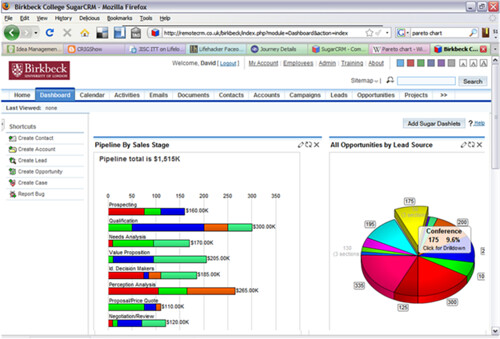
    For major donors/prospects, it is a key thing to be able to see at what stage in the cultivation process any individual is, and the pipeline for all such prospects, probably broken down for each fundraiser/team. And to know not just numbers, but how long they have been at each stage, averages, propensity for giving and so on.
  • Pareto report
    The (now) classic breakdown which shows, usually in percentiles, just how much income is coming from each such percentile of our database, and which often shows Pareto's 80/20 rule. Oh, and we want to be able to then drill-down into each segment please so we can see the specific information on each donor. It's not an overly-sophisticated report in terms of data output, but it can be difficult to create for end-users.
  • Cumulative income of each source/appeal, fund, campaign etc
    Most databases can tell us how much we have raised for each fund, source etc. But it is as useful to be able to see this (as a graph) over a time period, so we can see how each such fund/source has progressed over time. And to be able to compare multiple funds/sources etc on the same report/graph.
  • Lifetime values
    Lifetime value calculations can be very difficult. Because although it can be a simple ‘how much has someone given’ calculation, for the more sophisticated marketer, they will want to be able to incorporate spend, time periods, maybe include/exclude particular segments, use more complex formulas. And to be able to analyse this by each source, first appeal/campaign responded to, type of donor etc. To have better knowledge like this would be so useful to many fundraising departments.
Oh – and a final wish – I want to be able to produce all the above reports looking at any segment of the database. i.e. if I decide I want to include and report on just those aged between 50 and 70 then I should be able to; if I only want people flagged as ‘members’; those in a specific geographical area; those who have responded to a specific mailshot and have a dog. Called Charlie. Because it’s all very well being able to examine the statistics I have laid out above across the whole database, but it is even more useful and powerful to be able to do so across a specific segment. That’s when I can really start to use the database to understand my donors and prospects, compare segments and to be able to truly use it as a marketing tool.

Not much to ask, is it?!


What reports would you like to see? Give me your wish-lists in the Comments below.


Sunday, January 15, 2012

Infographics: can you produce them directly from a CRM database?

Think of it this way...
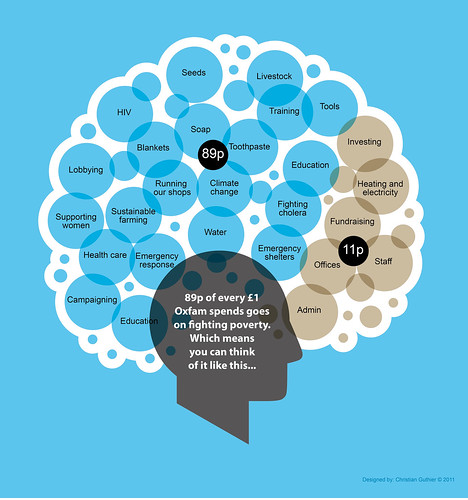
Everyone loves a good infographic. (I somehow assume everyone knows of David McCandless’s Information is Beautiful but if not then check it out now). And the source of infographics – the data – will very often come from an organisation’s (CRM) database. And although lots of good databases can produce useful reports and graphs, I don’t know of any which are used in the charity sector which can produce infographics direct from the database. (I know one who considered it, Lamplight Database Systems, who posted a blog last year with a few ideas).

Now there may be good reasons for this lack of CRM database functionality: I’m sure it isn’t easy to automate something like this; infographics are often an individualistic approach, almost an art form in their own right, and a database probably can’t produce such pictures in that way; infographics are dependent on the creator looking at the data and interpreting it in a way in which an automated system might not be able to; infographics may source data from multiple databases and data repositories; and so on.

But even with those caveats, surely it isn’t beyond the wit of extremely clever and bright designers and programmers to be able to create some form of infographic which could be automated from the database?

For instance, let’s take a comparatively straight forward fundraising income report. We know we can produce that from the database as a report or as pie chart/bar chart etc, but think of how interesting it would be, and the messages you could deliver, if that could be produced simply as an infographic.

And maybe that could be done like this: Maybe the database could have a selection of backgrounds which a user could choose (e.g. a collection box, a church, maybe a map or a selection of photos of people etc – or even an image which the user could upload, that would be even better); then a selection of icons which the user could select instead of the bar graph, different fonts and font sizes, boxes for free text and so on; and ideally let them move these items around on the page in some way. Thus, by combining these different factors, one could produce at least a few varieties of an infographic. Even better if they could then be exported in a format which could be imported into Photoshop or similar so the charity could make it a bit snazzier there.

Even that could give some charities without the skills or resources to create sophisticated infographics the ability to create some basic ones which might still look good on their web site for a particular campaign or in their annual report.

Or am I wrong? Do you use a database which can produce infographics direct from it? Or do you sell one? If so, let me know.

A Challenge to Fundraising & CRM Database Suppliers
But assuming not then… how about this as a bit of a challenge to the database suppliers out there?! Come on you software companies - what do you say?! Can any of you show me that you can produce infographics direct from your database? If you can then let me know and I may produce a follow-up post to this one with the best of them. And surely a good infographic has got to be good for your sales demos hasn’t it?!

Taking a leaf from David McCandless: let’s make things beautiful – even database output.

Monday, April 18, 2011

9 Guaranteed Ways to Improve the Use of Your Database : Part 2

This is the second part of my blog on guaranteed (really!) ways to improve the use of your database. (But please do refer to my first part for a couple of caveats on the Ease, Time and Cost points...)

6. Instigate a structured training (and learning) culture

One of the most common complaints from end-users of CRM systems is that they have not received sufficient training. The training may have come from the person who’s job they were replacing, it may have come from someone else entirely who knows a bit about the system, it may come from someone who has been at the charity for years and is still following processes which are way out of date. Or they may have just been given an old, dog-eared collection of papers and told that is the user manual – or they may not have had any training at all!

If you want your database to be better then you need people to use it as it is intended. And therefore you need to train them. Properly. By people who know what the database should be doing, who know what the latest processes are, who have the time to train someone, who are happy and comfortable training someone - and, of course, training someone who has the time and inclination to learn. Being trained on your organisation’s database should be part of someone’s induction plan when they join your charity.

I also distinguish between a 'training' and a 'learning' culture: individuals should be encouraged to learn more about the system(s) they are using. This isn’t necessarily easy! Why should they bother learning something or asking more about something or wanting to improve something if it doesn’t help them with their job? So make it so that such practise does help them with their job. If they can’t do something on the database then encourage them not to remain quiet but to tell someone. If they have a good idea then get them to tell someone. The more people learn about what is possible on a database then the more they, you and the organisation will get out of it.


Ease: No technical skills, but needs Senior Management support Time: On-goingCost: Free


7. Create reports (and dashboards) your users and managers really want

If you really want to improve the use of your database, then you need to give users and managers information which they really want. So ask them what information they want, ask them what would really help them in their every-day role and with their strategic role, ask them what is most important to them and what they have always wanted to know! You might want to “manage expectations” around this by explaining that you might not give them what they want tomorrow... but you will try! You might also find that they can’t get such reports because no-one is collecting the data they want. So they can then help you rectify that.

Then create reports which they can use. And dashboards – managers love dashboards.


Ease: Needs technical skills Time: Each report might take from a day to many days!Cost: Free if you can do it internally (Otherwise you'll need to pay someone)


8. Create a Business Analyst role

This is one of the best ways you can get more out of your data and database, but it is also one of the more expensive. Human Resources always is. But what a Business Analyst (BA) will bring you to your organisation, if you don’t akready have one, might change and improve the way you do things so that they will more than pay back their salary.

Because what a good BA can do is go out to the users and discuss their needs, ask the managers what information they want, examine the procedures and processes you have, work on strategic documents with your staff, analyse data, analyse the database, produce options for change, make recommendations and help implement. They can act as the “bridge” between your database team and your users.

I realise this might sound like some “impossible creature” to some people, but really, they can be one of the most important roles in any organisation. To have someone who understands data and databases and what they can and can’t do, but can talk to your users and understand their business is gold-dust. If you find someone who can do this for you, hang on to them!

I should also say that although I use the term "Business Analyst" and define it here as a specific role, if you have someone who can do this sort of work even if they are formally called the "Database Manager" or any other similar position, then that is just as valuable. It's the skills and process which are important, not the job title per se.


Ease: Can be quite difficult to find someone good Time: Permanent roleCost: Expensive, as in you need a full-time employee on a reasonable salary


9. Get rid of any Data Ownership hang-ups

I’ve blogged about this before, so to summarise here:

Many charities are now moving away from "data silos" and the concept of "owning one's records". Which is great news and about time. So the next time one of your users/colleagues/staff says to you, "I don’t want my contacts to be stored on a central database because I don't want anyone else to be able to contact them…" then this is the response I recommend you give them:

The fundamental problem with this is that if they don't store their contacts on the central database (and instead, for example, keep them stored in Excel) then, in actual fact, it will be impossible for them to stop anyone else contacting them - assuming that such contacts have - or will have - other relationships with your organisation which are already stored on the central database. For example, if your user is the events manager, then if any of their event registrants are also donors, volunteers, prospects, on other mailing lists etc and as such they are already stored on the central database, then how can the events manager stop them being mailed? No-one using the central database will know that they are also on the separate events spreadsheet. Moreover, they will probably need to be contacted sometimes by other users anyway.

And anyway, it isn’t “my data”, it is the charity’s data. Start using it for the holistic benefit of the charity.


Ease: In theory easy, but you get stubborn individuals! Time: Instant to instigate, may take time for everyone to buy-inCost: Free


I hope you find all these suggestions useful. They really will improve your database if you put them into practise in a structured and considered way.

And if you have any other suggestions then by all means leave a comment below.

Tuesday, November 30, 2010

Getting Data Out of Your Database

I still come across too many database implementations where the users simply cannot get the data out of their system unless they have a degree in rocket science (well, a qualification in normalisation and ER diagrams at least), and even then, it doesn’t always give them what they want. And it is such a fundamental aspect of any database that it negates half the purpose of implementing the system in the first place: so many of the benefits of a database come from reporting, analysis, querying, mailings, data extractions, segmentation and so on, so if you can’t get the data out of your database then what is the point of having it?

Remember this incorporates two key elements: obviously, the creation of the actual reports, mailing fields etc is one, but the ability to select and segment on the required records/data is another. Even if you can get the necessary data fields out of the system, you still have to be able to extract/report on just those records/supporters which you are interested in on a specific occasion. That is an area which some systems still fall down on unless you do have technical skills.

So what you can do about this to prevent this from happening?
The ideal scenario for most small to medium (and many larger) charities and NFPs is that trained users – there will always be an element of training – can get the data out of the system for many of the above purposes, at a fundamental level at least, without recourse to an IT/database expert. That usually means having a GUI approach (Graphical User Interface) of some sort (i.e. rather than having to write SQL) and/or having flexible enough reports and screens that are parameter-driven so that users do not have to understand how the data is stored or structured. They clearly still need to know where the data is stored, in which fields, and how the data is used but not so they have to know any programming skills.

Such interfaces might be native to the product (perfect if they are flexible enough) and if a product has a good built-in report writer and query tool then that is a great option. That said, the key word there (rather obviously) is “good”, because if it still can’t extract the data the users want then it may as well not be there.

An alternative, and often still a good option for flexible data reporting/extraction etc is through a third-party reporting/analysis application which can access the database; e.g. Microsoft SQL Reporting Services, Crystal Reports, QlikView. Such tools do vary in their level of ‘technical knowledge’ which a user needs, so you need to choose carefully to ensure your users are comfortable with whichever product is selected.

Ideally, the database supplier would bundle such software with their system so that it is integrated ‘tightly’ enough in order that there is minimal additional work needed by the users to get the data integration aspects set-up and then use the data. Or at least provide documentation on how to integrate with their table structure. Even Microsoft Access query tool is a start – it leaves plenty to be desired, and there are better ways of querying a database - but at least you don’t have to know SQL..

Extracting all data
But even if the above is not possible (and actually, in most cases, even if it is) then the system must at least allow you to be able to do a straight forward data export of the data into another system where you can query it and use it further; e.g. Excel, Crystal Reports, SPSS and so on. And again, ideally by selecting the data and records through a native interface within the database. The problem with this is that very often extracting data from what is probably (hopefully!) a normalised database into a “flat file format” means data manipulation in another system can be complex and time-consuming because of “duplicates” created from “one to many relationships”.

But if your database can’t do that, or if it only offers limited tools or limited access to particular data entities, then you may need to resort to using SQL to enable the reporting, analysis, segmentation et al. But that means having serious IT skills and also learning and understanding the underlying database structure and that is not always easy if you didn’t design it yourself. Certainly it is not for the faint of heart and I sympathise with anyone who is not an IT person and has to do this.

The other critical factor…
However, even after saying all that, and even if you can get to the data in one way or another as per above, then there is another critical factor which must be considered: and that is that you must be able to access, query, extract, report on any item of data which you are storing - and unfortunately, some database packages do not always allow this, which is incredible, frustrating and very disappointing. If you are using SQL then that shouldn’t (?!) be a problem, but if your database has its own native analysis/extraction tool, then it isn’t always the case. 

So if you are looking at procuring a new database or you are about to take over the management of an existing system, or even if you are a fundraiser who would like to ensure that they can access their data in a useful and meaningful way, then do ensure that you can get the data out of the system as well as getting it in.